eSchoolPLUS Admin Mobile App
PowerSchool Group LLCEducationGoogle PlayeSchoolPLUS Admin Mobile App revenue and downloads, last 30 days
History
Daily readings as we observed them, last 30 days worldwide. Free shows the last 30 days.
One reading so far: history starts Nov 22, 2026, and a trend line appears after the next daily reading.
Monthly history: we have found no public-archive copy of this store page from the last 12 months, so monthly readings start with our own in Nov 2026.
Create a free account to save apps; Pro shows full history.
Chart positions
Where this app ranks on the top free, paid and grossing charts we capture.
Search terms
No search terms read for this app yet. Terms are read from its title and the searches it shows up in, and appear here once ranked.
In-app purchases
Prices
In-app purchase ladder, price changes and paywall terms
No in-app prices recorded yet. We read them from the store listing: either this app sells none, or its listing has not been read yet.
Ratings and reviews
Rating distribution
Store histogram
29 ratings
Recent reviews
Marketing
Paid ads, organic videos and onboarding captured for this app.
Paid ads
No Meta, Google or TikTok ads tied to this app yet. We check the public ad libraries daily.
Organic videos
No YouTube, TikTok or Instagram videos tied to this app yet.
Change history
Versions, price changes, rank jumps and listing edits, as we observed them.
Details
- Developer
- PowerSchool Group LLC, 11 apps
- Package
- com.sungardps.plus360admin
- Category
- Education
- Price
- Free
- Released
- May 17, 2013
- Updated
- Mar 17, 2026
- Version
- 1.7.0
- Size
- -
- Content rating
- Everyone
- Contact email
- mobile.support@powerschool.com
- Privacy policy
- www.powerschool.com/privacy/
- Languages
- Not available
- Charted in
- United States
- First seen
- Nov 22, 2026
- Listing read
- Nov 22, 2026
Show store descriptionShow less
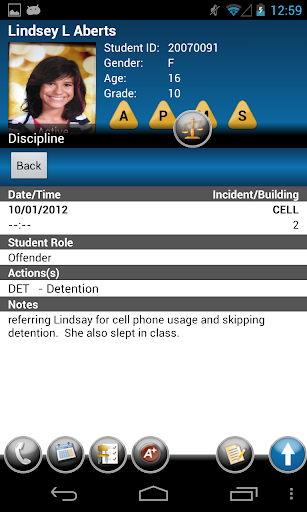
You’re frequently on the move—to classrooms, the cafeteria, large group instruction rooms, and athletic fields. With the eSchoolPlus Admin Mobile App, important student information can be where you are -on your mobile device. The app’s intuitive touch interface puts student schedules, attendance, medical records, emergency contact information, and other essential data at your fingertips, wherever you are. It also helps you manage your workload by allowing you to access the discipline referral process and communicate with district staff and student contacts anytime, anywhere. Features Robust Functionality, Information • Anytime, Anywhere Access. Student information is at your fingertips—contact information, class schedule, attendance, report card/individual progress reports, discipline, notes, demographics, and alerts, such as medical advisories. • Quick Search Capabilities. Easily find student information by scanning bar or QR codes on student ID cards, or search by key student data. The search engine provides results as a gallery of student photographs so you can be sure you are connecting with the right information. • Convenient Offline Mode. Student information is available even when a wireless connection is not, thanks to the app’s offline mode. This feature synchronizes basic information to your local device, secures it, and then makes it available when you’re not connected—on field trips, at athletic contests, or even during school emergencies. Powerful Mobile Office • Today at a Glance. The Dashboard features today’s class schedule and allows you to retrieve lists of students who are absent and who are celebrating their birthday. • Portable Notifications. When paired with the notification engine, the app extends the reach and timeliness of routine and emergency communications. You can read notifications wherever you are. • Discipline Reporting At-the-Scene. The discipline referral process is available wherever you need it. You can submit a conduct referral and add related documentation, like photographs and notes. • Timely Connections. Initiate conversations from your mobile device by tapping on phone numbers and e-mail addresses in a student’s contact information. Secure Access • Building-Specific and Student-Centric Data. Based on your eSchoolPlus domain and password, the app quickly takes you to the student information for your building. If you need to view information for more than one building, the app allows you to move there with ease. • Protection for Student Privacy. The app’s security, with encrypted data exchange, safeguards student data from prying eyes, either on the device or in the air. • Consistency with District Access Criteria. On first use, you will be required to enter a passkey to gain access to the district’s eSchoolPlus server. The district’s pre-established criteria determine what student information eSchoolPlus Admin Mobile App users can view.
More like this
- Top Education on Google Play by estimated revenue
- eSchoolPLUS Admin Mobile App alternatives
- eSchoolPLUS Admin Mobile App vs Raising Healthy Minds
- eSchoolPLUS Admin Mobile App vs Piano Marvel
- All top charts and categories
Similar apps
Raising Healthy MindsRaising Children Network4.0 ★ (31)
Piano MarvelPiano Marvel LLC3.0 ★ (31)
Genially ViewerGenially
CurrentaccidentNHO Elektro tidl. NELFO3.5 ★ (31)
Klein ISDApptegy Inc.3.4 ★ (31)
NasjonalmuseetNasjonalmuseet3.2 ★ (31)
英文隨手練:聽力訓練與每日新聞閱讀Hsin-Hung Chen5.0 ★ (31)
motmaina مطمئنةMotmaina Medical Center3.7 ★ (31)