
Spelling Test: Custom Lists
SyanacEducationGoogle PlayIn-app purchasesSpelling Test: Custom Lists revenue and downloads, last 30 days
How we got this (13 inputs)
- signals
- Play installs ÷ age; lifetime→current drift ×/÷4.12 (135278 measured Play counter deltas)
- spread
- measured on downloads ground truth (downloads ground truth: 48 App Store milestones, 33 platform splits, 13 drift points)
- installs
- 108
- age days
- 100
- note
- install counter moved once in 2.56 day(s); one step can hold several days of installs, so it is not read as a daily rate yet
- bound
- at most the lifetime installs counter (108) over 30 days: the listing is 100 days old, so its last 30 days cannot hold more installs than it ever had
- range scale
- ×0.88 (coverage scale on 9 ground-truth rows; publication is decided before it)
- likelyLow
- 17
- likelyHigh
- 55
- confidence
- medium
- observed days (of 30)
- 3
- measured days
- 0
- scaling
- observed days, scaled to 30
As of Nov 21, 2026.
How we got this (12 inputs)
- method
- installs in the window (all active on install day) + earlier installers active in the month (published retention ÷ the category's DAU/MAU stickiness) + the retained base of installers older than two years
- downloads per day
- 1.07 (0.33 to 2.57, the published worldwide figure)
- retention
- day 1 / 7 / 30: 20.66% / 5.7% / 2.14% (Android benchmark × 1.02 for the category; AppsFlyer Q3 2024 day-1/7/30 retention, via getstream.io/blog/app-retention-guide (read 2026-11-16); category: OneSignal 2024 day-30 retention by category, via getstream.io/blog/app-retention-guide (read 2026-11-16))
- active days per install
- 2.86 over 100 days
- stickiness
- 12.6% DAU/MAU, Education & Knowledge median (MWM DAU/MAU medians, US iOS, May 2026 (mwm.ai/glossary/dau-mau, read 2026-11-16))
- parts
- window installs 32 (the published 30-day downloads), earlier installers 8, retained base 0
- spread
- downloads ×/÷2.77, retention ×/÷3, tail ×/÷1.26, stickiness ×/÷1.8 (assumptions; not fitted)
- chart persistence (recorded, not used)
- 0 day(s) on a chart in the window; fewer than 7 live days exist
- bound
- at most the listing's 108 lifetime installs
- tier
- modelled: retention and stickiness are published benchmarks, not measured on this listing
- confidence
- low
- rough
- order of magnitude
As of Nov 21, 2026.
Daily active users
Modelled from this app's downloads and a published retention curve for its store and category, not measured. Read it as an order of magnitude.
History
Daily readings as we observed them, last 30 days worldwide. Free shows the last 30 days.
Downloads per day
Observed by us since Nov 18, 2026.
Installs, Play counter
Observed by us since Nov 18, 2026.
Monthly history: we have found no public-archive copy of this store page from the last 12 months, so monthly readings start with our own in Nov 2026.
Create a free account to save apps; Pro shows full history.
Chart positions
Where this app ranks on the top free, paid and grossing charts we capture.
Search terms
No search terms read for this app yet. Terms are read from its title and the searches it shows up in, and appear here once ranked.
In-app purchases
Google Play shows one in-app price range per storefront, not each product's price. The range over time, as the store published it:
United States, USD
- $29.99 per itemNov 23, 2026 to now
Prices
In-app purchase ladder, price changes and paywall terms
No itemised in-app prices yet. Google Play publishes only the price range shown above, not each product; the individual products and their prices have not been read.
Ratings and reviews
Rating distribution
No rating distribution read yet.
Recent reviews
Marketing
Paid ads, organic videos and onboarding captured for this app.
Paid ads
No Meta, Google or TikTok ads tied to this app yet. We check the public ad libraries daily.
Change history
Versions, price changes, rank jumps and listing edits, as we observed them.
Details
- Developer
- Syanac, 25 apps
- Package
- com.syanac.scribe
- Category
- Education
- Price
- Free
- Released
- Aug 13, 2026
- Updated
- Aug 25, 2026
- Version
- 1.0.0
- Size
- -
- Content rating
- Everyone
- Website
- kanac.github.io/syanac
- Contact email
- ac.anthony.chui@gmail.com
- Privacy policy
- kanac.github.io/syanac-legal/
- Languages
- Not available
- Charted in
- United States
- First seen
- Nov 18, 2026
- Listing read
- Nov 23, 2026
Show store descriptionShow less
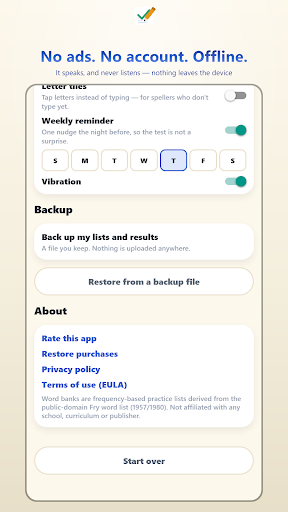
Spelling Test: Custom Lists turns your own English word lists into spelling practice: listen to a word, type the answer and return to mistakes. Add weekly school words or an adult learner’s difficult spellings. The interface and built-in words are English; dictation uses installed English voices with US-English pronunciation settings. Spelling practice and spelling tests for kids: enter your own word list, listen to each word, type the answer and review mistakes. YOUR WORDS, YOUR SPELLING LIST A school spelling test is easier to prepare for when practice uses the same list. Create a list for a child, add the words sent home, and include an optional example sentence when a word needs context. Keep separate lists for different learners or purposes, such as weekly spellings, a tricky word group or vocabulary you want to spell more accurately. Custom answers are checked against the spelling you entered. You can therefore use your school's spellings in a personal list even though the built-in banks use US English. Review the words and example sentences as you enter them, and check how the installed voice says them before relying on a list for independent practice. LISTEN, TYPE AND CHECK In test mode, the app says the word without displaying its spelling. The learner types the answer and receives a result. An example sentence can distinguish words that sound alike, such as two different spellings of the same sound. Built-in homophone cases include authored context sentences to make the intended word clearer. The app dictates words; it does not listen to the learner. No microphone or spoken-answer grading is used. This is English word spelling practice, rather than a pronunciation assessor or a tool for transcribing whole spoken sentences. A typed answer is what the app checks. PRACTICE BEFORE THE TEST Practice mode shows and speaks a word so the learner can study it and type it. Use that visible-word step when a list is new, then switch to listening without the answer on screen. After a test, return to missed words for another focused drill instead of repeatedly working through words that are already familiar. Answer checking ignores letter case and surrounding spaces and recognizes equivalent apostrophe forms. Accents still matter: a word with an accent should be entered with that accent. This keeps the exercise about the spelling of the chosen word while accommodating common keyboard punctuation differences. BUILT-IN WORD PRACTICE The app includes 1,000 built-in English words: 800 from Fry-derived frequency bands and 200 commonly misspelled words in the adult/ESL bank. Use a bank when you want a ready-made starting point, or create a custom list when the words for school, work or personal study are more specific. Fry groups are frequency bands, not a school curriculum, grade-level standard or an official school spelling list. The words you select should match the learner's needs. The adult/ESL bank also uses English words and US spellings; it is a spelling resource, not a complete English-language course or a translation dictionary. KEEP LEARNERS' PRACTICE SEPARATE Organize lists and practice around individual spellers. A parent helping more than one child can return to the relevant learner's work, while an adult learner can keep a separate set of words. Per-child weekly streaks reflect weeks with a completed test, and an optional local weekly reminder can help you return on a chosen evening. LOCAL PRACTICE WITH DEVICE SPEECH Lists and practice records are stored locally without a classroom account or cloud service. Dictation uses the device's installed English voices. Test the voice before an offline session; sound output is required to hear the words. The app is ad-free. Its store description may be translated, but the interface, built-in study words and speech workflow remain English. A parent or learner who needs instructions in another language should take that into account when choosing it.




More like this
- Top Education on Google Play by estimated revenue
- Spelling Test: Custom Lists alternatives
- Spelling Test: Custom Lists vs 한국사 능력
- Spelling Test: Custom Lists vs LearnPal: AI English Tutor
- All top charts and categories


