Check Internet Data Usage
SYSTWEAK SOFTWAREToolsGoogle PlayContains adsCheck Internet Data Usage revenue and downloads, last 30 days
How we got this (8 inputs)
- signals
- free, no IAP, on no grossing chart; ratings ÷ age
- method
- free, no IAP, on no grossing chart
- note
- the store lists no in-app purchases: likely monetises outside the store; range runs from $0 to what a comparable app with in-app purchases makes at its median
- likelyLow
- 0
- likelyHigh
- 3335.51
- confidence
- low
- rough
- order of magnitude
- observed days (of 30)
- 2
As of Nov 21, 2026.
How we got this (12 inputs)
- signals
- Play installs ÷ age; lifetime→current drift ×/÷4.12 (135278 measured Play counter deltas)
- spread
- measured on downloads ground truth (downloads ground truth: 48 App Store milestones, 33 platform splits, 13 drift points)
- installs
- 1026713
- age days
- 3816
- bound
- at most the lifetime installs counter (1026713) over 30 days: the listing is 3816 days old, so its last 30 days cannot hold more installs than it ever had
- range scale
- ×0.88 (coverage scale on 9 ground-truth rows; publication is decided before it)
- likelyLow
- 6853
- likelyHigh
- 24145
- confidence
- medium
- observed days (of 30)
- 2
- measured days
- 0
- scaling
- observed days, scaled to 30
As of Nov 21, 2026.
How we got this (13 inputs)
- method
- installs in the window (all active on install day) + earlier installers active in the month (published retention ÷ the category's DAU/MAU stickiness) + the retained base of installers older than two years
- downloads per day
- 429.47 (129.1 to 1409.63, the published worldwide figure)
- retention
- day 1 / 7 / 30: 23.7% / 6.54% / 2.45% (Android benchmark × 1.17 for the category; AppsFlyer Q3 2024 day-1/7/30 retention, via getstream.io/blog/app-retention-guide (read 2026-11-16); category: OneSignal 2024 day-30 retention by category, via getstream.io/blog/app-retention-guide (read 2026-11-16))
- active days per install
- 6.25 over 730 days (age 3816 days; the curve is used to 730)
- stickiness
- 17.5% DAU/MAU, Productivity & Tools median (MWM DAU/MAU medians, US iOS, May 2026 (mwm.ai/glossary/dau-mau, read 2026-11-16))
- parts
- window installs 12884 (the published 30-day downloads), earlier installers 10137, retained base 34200
- retained base
- 713386 installers older than 730 days (lifetime from the listing's Play installs counter) × 4.79% active in a month (between 1.63%, the benchmark curve held flat, and 14.1%, median disclosed MAU ÷ lifetime installs of Duolingo, Snapchat and Grindr (company filings, data/ground-truth-active-users.csv; chosen on these rows, scored leave-one-product-out)); range ×/÷2 past each (widened after the leave-one-product-out check)
- spread
- downloads ×/÷3.3, retention ×/÷3, tail ×/÷1.58, stickiness ×/÷1.8, retained base ×/÷5.89 (assumptions; not fitted)
- ratings per download (recorded, not used)
- 0.0027400000000000002
- chart persistence (recorded, not used)
- 0 day(s) on a chart in the window; fewer than 7 live days exist
- tier
- modelled: retention and stickiness are published benchmarks, not measured on this listing
- confidence
- low
- rough
- order of magnitude
As of Nov 21, 2026.
Daily active users
Modelled from this app's downloads and a published retention curve for its store and category, not measured. Read it as an order of magnitude.
History
Daily readings as we observed them, last 30 days worldwide. Free shows the last 30 days.
Downloads per day
Observed by us since Nov 19, 2026.
Revenue per day
Observed by us since Nov 19, 2026.
Ratings (worldwide)
Observed by us since Nov 19, 2026.
Installs, Play counter
Observed by us since Nov 19, 2026.
Monthly history: we have found no public-archive copy of this store page from the last 12 months, so monthly readings start with our own in Nov 2026.
Create a free account to save apps; Pro shows full history.
Chart positions
Where this app ranks on the top free, paid and grossing charts we capture.
Search terms
No search terms read for this app yet. Terms are read from its title and the searches it shows up in, and appear here once ranked.
In-app purchases
Prices
In-app purchase ladder, price changes and paywall terms
No in-app prices recorded yet. We read them from the store listing: either this app sells none, or its listing has not been read yet.
Ratings and reviews
Rating distribution
Store histogram
4,195 ratings
Recent reviews
Marketing
Paid ads, organic videos and onboarding captured for this app.
Paid ads
No Meta, Google or TikTok ads tied to this app yet. We check the public ad libraries daily.
Organic videos
No YouTube, TikTok or Instagram videos tied to this app yet.
Change history
Versions, price changes, rank jumps and listing edits, as we observed them.
Details
- Developer
- SYSTWEAK SOFTWARE, 17 apps
- Package
- com.systweak.checkdatausage
- Category
- Tools
- Price
- Free
- Released
- Jun 10, 2016
- Updated
- Mar 17, 2026
- Version
- 5.1.6.09
- Size
- -
- Content rating
- Everyone
- Website
- www.systweak.com
- Contact email
- gplay@systweak.com
- Privacy policy
- www.systweak.com/privacy-policy
- Languages
- Not available
- Charted in
- United States
- First seen
- Nov 19, 2026
- Listing read
- Nov 23, 2026
Show store descriptionShow less
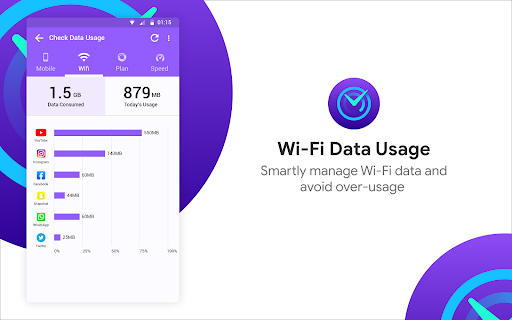
Are you worried that you might exhaust your data plan while streaming videos on OTT or playing games on your mobile? Are you working from home with mobile data? Worry no more! Manage your data plan and avoid over-usage with this mobile data usage app. Monitor your data usage on Android using Check Data Usage by Systweak Software. This data monitoring app is the perfect tool to track internet usage on your smartphone. It can show you the total data consumption on a daily basis. You can set a plan to limit data usage on your device and save money. Additionally, the Check Data Usage app allows you to check the internet speed. You can also check which apps use the most and least amount of data on your device with this data tracker app. Get notifications on exceeding the set data limit from your plan. Features of Check Internet Data Usage:- ● Check mobile data usage: Find out the mobile data usage on your Android device. ● Check Wi-Fi data usage: Get information on real-time data consumption with Wi-Fi. ● Limit data usage: Set a plan to limit data usage on your Android and save money. ● Speed Test: Run a quick speed test with Check Data Usage app to learn about your internet speed. ● App-wise data usage: Shows data consumption for each app individually. ● Notification display: Check the data usage statistics in the overlay notification tray. Reasons to use Check Data Usage by Systweak Software:- ● Real-time updates - With this data manager , get the real-time data updates on your Wi-Fi and mobile data consumption. ● Data monitoring tabs - Helps users to keep track of data usage whether on mobile data or Wi-Fi. ● Speed test - Quickly find out the internet speed on your device. ● Set Data Plan - Easily set the mobile data usage with details such as Plan Validity, Data limit and Starting date. ● Get Reminders - This internet data usage monitor app sends data alerts for exceeding the plan limit. ● Plan History - Always stay informed and get detailed information on the older data-usage plans set on the application. ● Easy-to-use - Simple interface shows all the important information on the home screen of the app. Steps to check data usage on Android:- Step 1: Open Check Data Usage by Systweak Software, grant necessary permissions to access the device data usage. Step 2: Tap on Set Data Plan and enter the specific details. Step 3: To apply the changes, tap on ‘Set Data Plan’. Now, it will show you the total data consumption along with the app-wise data usage on the home screen. Get the internet data usage monitor app now! NOTE: The application requires all the permissions required to run the data monitoring app . We at Systweak Software never save your data. Feel free to allow the permissions, as we assure you that your files are safe and your privacy is maintained. For more information, visit the official website - https://www.systweak.com/check-data-usage
More like this
- Top Tools on Google Play by estimated revenue
- Check Internet Data Usage alternatives
- Check Internet Data Usage vs Peekly: Unseen Chat & Track
- Check Internet Data Usage vs Bijoy Android Keyboard
- All top charts and categories
Similar apps
Peekly: Unseen Chat & TrackHand of Midas Lab4.1 ★ (4.3K)
Bijoy Android KeyboardAnanda Computers ( আনন্দ কম্পিউটার্স )1.2 ★ (4.3K)
Recovery Pro - File RecoveryMakes Your Life Easier4.2 ★ (4.3K)
OnePlus ConnectOnePlus Ltd.3.5 ★ (4.3K)
Push VPN – Stable VPN ProxySol Sol App6544724.1 ★ (4.3K)
Talklock: AI Voice Lock ScreenGINBOX4.5 ★ (4.3K)
فیلتر شکن قوی پرسرعت Nova vpnSol Sol App6544724.4 ★ (4.3K)
Transfer My Data - Phone CloneCodix Apps4.0 ★ (4.3K)