Lua Viewer: Lua Editor
TechnoifyToolsGoogle PlayContains adsLua Viewer: Lua Editor revenue and downloads, last 30 days
History
Daily readings as we observed them, last 30 days worldwide. Free shows the last 30 days.
One reading so far: history starts Nov 23, 2026, and a trend line appears after the next daily reading.
Monthly history: we have found no public-archive copy of this store page from the last 12 months, so monthly readings start with our own in Nov 2026.
Create a free account to save apps; Pro shows full history.
Chart positions
Where this app ranks on the top free, paid and grossing charts we capture.
Search terms
No search terms read for this app yet. Terms are read from its title and the searches it shows up in, and appear here once ranked.
In-app purchases
Prices
In-app purchase ladder, price changes and paywall terms
No in-app prices recorded yet. We read them from the store listing: either this app sells none, or its listing has not been read yet.
Ratings and reviews
Rating distribution
Store histogram
79 ratings
Recent reviews
Marketing
Paid ads, organic videos and onboarding captured for this app.
Paid ads
No Meta, Google or TikTok ads tied to this app yet. We check the public ad libraries daily.
Organic videos
No YouTube, TikTok or Instagram videos tied to this app yet.
Change history
Versions, price changes, rank jumps and listing edits, as we observed them.
Details
- Developer
- Technoify, 8 apps
- Package
- com.technoify.luafileviewer
- Category
- Tools
- Price
- Free
- Released
- Apr 30, 2022
- Updated
- Feb 1, 2026
- Version
- 1.0.10
- Size
- -
- Content rating
- Everyone
- Website
- technoify-39e40.web.app
- Contact email
- technoify46@gmail.com
- Privacy policy
- technoify-39e40.web.app/privacypolicy.html
- Languages
- Not available
- Charted in
- United States
- First seen
- Nov 23, 2026
- Listing read
- Nov 23, 2026
Show store descriptionShow less
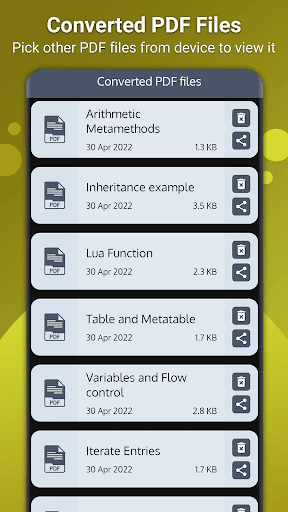
Are you a student, programmer, or just someone who likes to experiment with coding? Lua Viewer is the perfect answer to your needs. Lua is a powerful and flexible programming language. Lua Viewer is the perfect tool for viewing and editing Lua scripts; it's not only a simple yet powerful editor, but also the best way to convert Lua to PDF. Edit your files with a user-friendly interface, and save your changes for future use. As a lua developer, you need a lua file opener that can read and edit any file you want. This is the solution for you. With an undo and redo option, it helps you go back and forth in your programming process. . Lua file reader also support find and replace operation with which you can easily find any word and replace it with another word. With lua editor you can easily go to any line number within editor, change editor text size etc. Lua file opener is a tool for both developer as well as for newbie who are learning lua. Lua Editor has different themes which will beautify the code more with his different syntax highlighting. Lua file opener support find and replace operation which help the developer more while editing the code. Lua is a lightweight scripting language. Lua Viewer is a lua file reader which supports different features like pinch to zoom, auto code completion, auto indentation and enable/disable editor line number. Key Features of Lua Reader 1. View and edit lua source code 2. Editor different themes with syntax highlighting 3. Change editor text size 4. Support Pinch to zoom, Auto indentation and undo, Redo 5. Support Find & replace operation 6. Convert lua to pdf file 7. Print PDF files 8. To view pdf file there is built-in PDF viewer Lua file opener has the ability to open and edit lua files. With its light and dark app themes, it will suit your needs even if you work in a dark room. You can customize settings to suit your needs and make Lua Viewer as personal as you want it to be! Lua Viewer is a fast, lightweight, and easy to use reader application that you can use to read and convert any lua to pdf files on your device with no code loss. You can directly print pdf file. You can also use the app to view pdf files saved in your device. All edited files of lua viewer are saved in device and are viewed within the app to open it directly within editor. Lua editor is very useful tool for viewing and editing lua files, if the app is helpful to you then support us by your positive feedback.
More like this
- Top Tools on Google Play by estimated revenue
- Lua Viewer: Lua Editor alternatives
- Lua Viewer: Lua Editor vs XBB Configurator
- Lua Viewer: Lua Editor vs Antique & Vintage Identifier
- All top charts and categories
Similar apps
XBB ConfiguratorInnoware Development AB4.0 ★ (80)
Antique & Vintage IdentifierEternalBeam Software4.3 ★ (80)
Automatic Call Recorder PROQ4U Mobile Apps1.2 ★ (80)
Code Viewer & Code EditorTechnoify3.5 ★ (80)
Tools for Old School RunescapeKeith Gulbro3.3 ★ (80)
Anime Skins for MinecraftSureLabs2.0 ★ (80)
RiftScan - Card & Deck ToolPiotr Drews4.9 ★ (80)
Visual ear spoonJieshi Intelligent Technology (Shenzhen) Co., Ltd3.1 ★ (80)