
바로문서 - hwp · 한글 문서 편집기
Wilgon LabProductivityGoogle PlayIn-app purchasesContains ads바로문서 - hwp · 한글 문서 편집기 revenue and downloads, last 30 days
History
Daily readings as we observed them, last 30 days worldwide. Free shows the last 30 days.
One reading so far: history starts Nov 23, 2026, and a trend line appears after the next daily reading.
Monthly history: we have found no public-archive copy of this store page from the last 12 months, so monthly readings start with our own in Nov 2026.
Create a free account to save apps; Pro shows full history.
Chart positions
Where this app ranks on the top free, paid and grossing charts we capture.
Search terms
No search terms read for this app yet. Terms are read from its title and the searches it shows up in, and appear here once ranked.
In-app purchases
Google Play shows one in-app price range per storefront, not each product's price. The range over time, as the store published it:
United States, USD
- $3.59 per itemNov 23, 2026 to now
Prices
In-app purchase ladder, price changes and paywall terms
No itemised in-app prices yet. Google Play publishes only the price range shown above, not each product; the individual products and their prices have not been read.
Ratings and reviews
Rating distribution
No rating distribution read yet.
Recent reviews
Marketing
Paid ads, organic videos and onboarding captured for this app.
Paid ads
No Meta, Google or TikTok ads tied to this app yet. We check the public ad libraries daily.
Organic videos
No YouTube, TikTok or Instagram videos tied to this app yet.
Onboarding
No store screenshots, web funnel or in-app recording captured for this app yet.
Change history
Versions, price changes, rank jumps and listing edits, as we observed them.
Details
- Developer
- Wilgon Lab, 4 apps
- Package
- com.tonydev901.hwpx
- Category
- Productivity
- Price
- Free
- Released
- Nov 21, 2026
- Updated
- Nov 22, 2026
- Version
- 0.3.0
- Size
- -
- Content rating
- Everyone
- Contact email
- tonydev901@gmail.com
- Privacy policy
- wilgon456.github.io/barodocs-policy/privacy.html
- Languages
- Not available
- Charted in
- United States
- First seen
- Nov 23, 2026
- Listing read
- Nov 23, 2026
Show store descriptionShow less
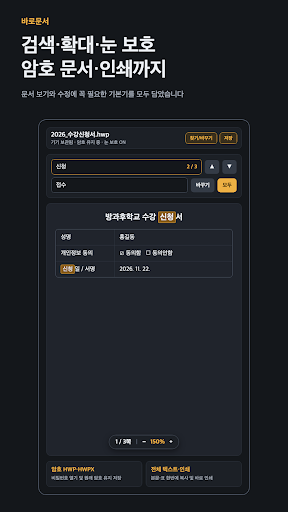
Open, fill out, and sign HWP, HWPX, and PDF documents received via KakaoTalk or email directly on your mobile phone without logging in. BaroDocument is a lightweight Hangul document app that processes documents 100% on your device without transmitting them to an external server, allowing you to safely save and share copies of the received original file without altering it. [Why BaroDocument?] • No Login · 100% Offline Processing: You can safely open application forms and official documents containing personal information. • Automatic Blank Detect + Auto-complete My Info: Find blank spaces and text boxes in tables to fill in names, contact information, addresses, and more in one go. • One-Tap Checkbox (□↔☑ · ○↔●) Switching: Change the checkbox symbols for agreements and surveys—common in Korean forms—with a single tap without having to search for special characters. • Save Handwritten Signature & Place Signature in PDF: Save your handwritten signature on your device and insert it directly onto your desired page and location when saving or printing PDFs. • Support for Password-Protected HWP/HWPX: Opens password-protected documents and retains the original password even when saving HWP/HWPX copies after modification. [Powerful Viewer & Convenient Editing Features] • Find & Replace within documents: Searches both text and table cells, highlights them, and performs a single replacement or a full replacement (undo supported). • Clear Zoom & Page Number Navigation: Zoom in on HWP/HWPX (75%~300%) and PDF (100%~300%) using pinch gestures or buttons, and jump directly to the desired page. • Extract Paragraph & Full Text Copy: Collect text from documents with complex tables on a single screen to copy the entire document or share it directly to other apps. • Eye-Protection Dark Reading & Remember Last Page: Supports inverted reading on a dark screen and automatic return to the last viewed page per document. • Print to Android & Preserve Original: Print modified HWP/HWPX (PDFs with signatures supported) and PDFs immediately, and provides automatic archiving and recovery of revisions on your device even while working. [Guide and Support Scope] • The handwritten signature feature is a convenience function for inserting handwritten signature images/vectors into documents and is not a legal electronic signature based on a joint certificate. • Depending on the document format and structure, some fonts or layouts may appear different from the original. Direct editing is restricted for some paragraphs containing complex objects such as tables or figures to protect those objects (text copying is possible). • Text selection is not available for PDFs generated from images in HWP/HWPX. • Direct viewing and editing of DOC/DOCX files are currently not supported (transfer to other apps is possible). • For important documents, please perform a final verification of the saved copy in your existing PC document program. Banner advertisements are included on the home screen, and all features are available in the free version. Purchasing a one-time payment (Lifetime Ad Removal) will permanently remove banner ads without a permanent subscription. This app is not an official product of Hancom. Contact & Support: tonydev901@gmail.com Privacy Policy: https://wilgon456.github.io/barodocs-policy/privacy.html



More like this
- Top Productivity on Google Play by estimated revenue
- 바로문서 - hwp · 한글 문서 편집기 alternatives
- 바로문서 - hwp · 한글 문서 편집기 vs PDF Reader: View Documents
- 바로문서 - hwp · 한글 문서 편집기 vs Smart Transfer: Copy My Data
- All top charts and categories
Similar apps
PDF Reader: View DocumentsCrow Drama Studio
Smart Transfer: Copy My DataDigiGen Apps
Smart Switch App File TransferCoddeX Studio
AI Voice Changer: TTSMatechmobile Global
AI Translate: Voice & CameraSING HUI PTE. LTD.
PDF Reader: Converter & EditorStyle Of Me - VTN Global
Clean TurboFreeTree Studio
PDF Reader & Document ViewerOSIAS CAPITAL