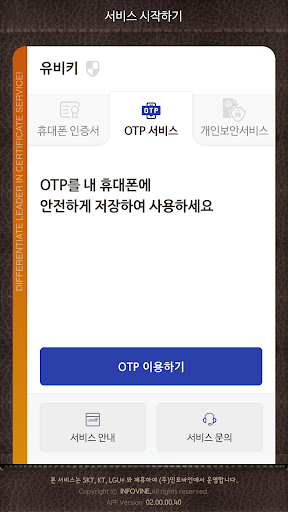
휴대폰 인증서 서비스(유비키_UBIKey)
(주)인포바인FinanceGoogle PlayIn-app purchases휴대폰 인증서 서비스(유비키_UBIKey) revenue and downloads, last 30 days
How we got this (9 inputs)
- signals
- grossing chart; ratings ÷ age
- grossing kr
- 1507 (FINANCE#18.2×82.6)
- ratings/day
- 1.53
- monetisation
- finance ARPD 0.2; has IAP
- range
- 80% interval from out-of-fold residuals (×1.12 scale, 90 products)
- likelyLow
- 6145.37
- likelyHigh
- 24561.07
- confidence
- medium
- observed days (of 30)
- 6
As of Nov 21, 2026.
How we got this (10 inputs)
- method
- Play install counter: total accepted delta ÷ elapsed days
- measured days
- 5.14
- window
- 2026-11-15..2026-11-21
- step spread
- ×/÷1.36 (the counter moves in steps; narrows with more days)
- likelyLow
- 31587
- likelyHigh
- 83499
- confidence
- medium
- observed days (of 30)
- 6
- measured days
- 2
- scaling
- projected to 30 days from 5.1 measured days (2026-11-15..2026-11-21, counter 8778890 → 8784016) plus 24.9 modelled days
As of Nov 21, 2026.
How we got this (13 inputs)
- method
- installs in the window (all active on install day) + earlier installers active in the month (published retention ÷ the category's DAU/MAU stickiness) + the retained base of installers older than two years
- downloads per day
- 1646.4 (704.13 to 4464.47, the published worldwide figure)
- retention
- day 1 / 7 / 30: 20.69% / 5.71% / 2.14% (Android benchmark × 1.02 for the category; AppsFlyer Q3 2024 day-1/7/30 retention, via getstream.io/blog/app-retention-guide (read 2026-11-16); category: OneSignal 2024 day-30 retention by category, via getstream.io/blog/app-retention-guide (read 2026-11-16))
- active days per install
- 5.52 over 730 days (age 4345 days; the curve is used to 730)
- stickiness
- 17.5% DAU/MAU, Productivity & Tools median (MWM DAU/MAU medians, US iOS, May 2026 (mwm.ai/glossary/dau-mau, read 2026-11-16))
- parts
- window installs 49392 (the published 30-day downloads), earlier installers 33920, retained base 339632
- retained base
- 7583120 installers older than 730 days (lifetime from the listing's Play installs counter) × 4.48% active in a month (between 1.42%, the benchmark curve held flat, and 14.1%, median disclosed MAU ÷ lifetime installs of Duolingo, Snapchat and Grindr (company filings, data/ground-truth-active-users.csv; chosen on these rows, scored leave-one-product-out)); range ×/÷2 past each (widened after the leave-one-product-out check)
- spread
- downloads ×/÷2.52, retention ×/÷3, tail ×/÷1.57, stickiness ×/÷1.8, retained base ×/÷6.3 (assumptions; not fitted)
- ratings per download (recorded, not used)
- 0.00111
- chart persistence (recorded, not used)
- 9 day(s) on a chart in the window; fewer than 7 live days exist
- tier
- modelled: retention and stickiness are published benchmarks, not measured on this listing
- confidence
- low
- rough
- order of magnitude
As of Nov 21, 2026.
Daily active users
Modelled from this app's downloads and a published retention curve for its store and category, not measured. Read it as an order of magnitude.
History
Daily readings as we observed them, last 30 days worldwide. Free shows the last 30 days.
Downloads per day
Observed by us since Nov 15, 2026.
Revenue per day
Observed by us since Nov 15, 2026.
Ratings (worldwide)
Observed by us since Nov 15, 2026.
Installs, Play counter
Observed by us since Nov 15, 2026.
Monthly history
2 of the last 12 months have a reading. Before Nov 15, 2026 each reading is a copy of the store page kept by a public web archive, dated the day it was captured; a month with no copy found is left empty.
+0.5% a month in Play's install counter (45.9K a month), Mar 13, 2026 to the next reading 255 days later. Archive-derived: from public-archive copies of the store page, not an estimate.
4 older months with a reading, back to Jun 2018. Pro shows every month.
By country
30-day estimates per storefront, 1 storefront.
Create a free account to save apps; Pro shows full history.
Chart positions
On 1 chart at the latest capture. Charts are swept every 6 hours.
| Country | Top grossingFinance |
|---|---|
| South Korea | #17= |
Change is against the previous capture of the same chart.
Top grossing, Finance, South Korea
Observed since Nov 15 11:46 UTC.
Search terms
In-app purchases
Google Play shows one in-app price range per storefront, not each product's price. The range over time, as the store published it:
South Korea, KRW
- ₩1,100 per itemNov 23, 2026 to now
Prices
In-app purchase ladder, price changes and paywall terms
No itemised in-app prices yet. Google Play publishes only the price range shown above, not each product; the individual products and their prices have not been read.
Ratings and reviews
Rating distribution
Store histogram
6,662 ratings
Recent reviews
44 reviews collected since May 18, 2015 across 1 storefront
- ★★★★★Apr 5, 2024KRv02.00.00.51
Just want to kill the mesaage : It does not support this device
- ★★★★★Feb 14, 2024KRv02.00.00.51
Nice
- ★★★★★Jan 17, 2024KR
It is a scam. Charget 1 dollar every month
Marketing
Paid ads, organic videos and onboarding captured for this app.
Paid ads
No Meta, Google or TikTok ads tied to this app yet. We check the public ad libraries daily.
Change history
Versions, price changes, rank jumps and listing edits, as we observed them.
Details
- Developer
- (주)인포바인, 2 apps
- Package
- com.ubikey
- Category
- Finance
- Price
- Free
- Released
- Dec 29, 2014
- Updated
- May 27, 2026
- Version
- 02.01.00.61
- Size
- -
- Content rating
- Rated for 3+
- Website
- www.ubikey.co.kr
- Contact email
- ubikey_support@infovine.co.kr
- Privacy policy
- www.ubikey.co.kr/rule/private.asp
- Languages
- Not available
- Charted in
- South Korea
- First seen
- Nov 15, 2026
- Listing read
- Nov 23, 2026
Show store descriptionShow less
Due to a recent Google policy change, support for OS 4.1 or later has been applied. ☆ The mobile phone authentication service, UbiKey, is charged a monthly fee of 990 won (VAT included) upon download and subscription. SKT and KT budget phone users can use the service with a Google subscription fee of 1,100 won (VAT included). ☆ With the single mobile phone authentication service (UbiKey_UBIKey) app, customers of all three mobile carriers, SKT, KT, and LG U+, can access the certificates stored in the app. ☆ If a pop-up message regarding service interruption or ADB debugging appears, please update to the new app. ☆★ Save certificates stored on your smartphone to the app. ☆★ Two-step authentication (2FA) OTP function for logging into various online services (finance, portals, games, etc.) You can save certificates stored on your smartphone (in the NPKI folder) to the mobile certificate service app, allowing you to securely digitally sign documents for logins, financial transactions, identity verification, and other purposes. @ [Mobile Phone Icon] for Certificate Storage/PC Transfer within the App First, save the issued certificate within the mobile certificate service app. Then, when a certificate is required for web logins, financial transactions, identity verification, or e-commerce payments on a PC, you can transfer the certificate stored on your smartphone to your PC via the [Mobile Phone Icon] in the certificate window to perform digital signatures. You can conveniently and safely use the service on a wide range of partner sites, including major banks, credit card companies, insurance companies, PGs, and public institutions. It also integrates with smartphone banking apps, allowing you to use it with some banks. (Available banks: Shinhan Bank, SC First Bank, Busan Bank, Kyongnam Bank, Jeonbuk Bank, Daegu Bank, K Bank) ※ How to Use - Saving a Certificate on Your Smartphone 1. Download the mobile certificate service and launch the application. 2. In the PC certificate window, click the mobile phone icon and enter your smartphone number. 3. Select the certificate saved on your PC hard drive, enter your smartphone number, and enter the certificate password. 4. Enter the 4-digit security number generated on your smartphone in the PC window. 5. The certificate is now saved on your smartphone. - Using a Smartphone Certificate 1. Launch the mobile certificate service application on your smartphone. 2. In the PC certificate window, click the mobile phone icon and enter your smartphone number. 3. Enter the 4-digit security number generated on your smartphone in the PC window. 4. The certificate from your smartphone to your PC is now transferred. 5. Enter the certificate password in the PC window. @ Two-Step Authentication (2FA) OTP Function The OTP function securely and easily generates a 6-digit one-time password (OTP) for two-step authentication (2FA) using a mobile app when logging into various online services (such as social media, portals, and games). Strengthen your account security. To use OTP, you can register your service account's registration key in the app. ※ How to Use 1. Initial OTP Registration: After configuring OTP use on the website or service you wish to use, complete the registration process in the UBIKey app (e.g., scanning a QR code, uploading an image, entering a registration key, etc.). 2. OTP Generation Confirmation: Launch the UBIKey app and check the 6-digit OTP number for your registered account (automatically updated periodically). 3. OTP Entry: Enter the 6-digit OTP number displayed on the login/authentication screen of the relevant website or service within the time limit to complete authentication. > UBIKey, a mobile phone authentication service that combines two functions in a single app, is charged at the same rate as existing services. > Certificates stored in your smartphone's memory (NPKI folder) can also be saved in the app without connecting to a PC. > Cancellation Inquiries: Infovine Customer Center 02-718-1860 (Closed on public holidays 09:00-12:00, 13:00-18:00) or 114 from your mobile phone. * You can cancel your service on the Ubikey website (www.ubikey.co.kr). * Deleting the app alone will not cancel your service. To cancel, please follow the cancellation instructions above. > Tablets and some devices purchased overseas may not be able to use the service. > Corporate certificates are not available. > For detailed service usage instructions, please refer to the [Service Usage] menu. > Required Access Permissions The following information explains the access permissions used by the app. 1) Mobile Phone Number: We collect your mobile phone number to confirm your service subscription, verify your identity using your mobile phone information (including your phone number), store and use certificates within the app, check your mobile carrier and phone number status, and retrieve phone number information required for customer service calls. 2) Storage: To store the certificate within the app. 3) Notifications: Required to receive notifications when using the UBIKey service on a PC. > Optional Access Permissions 1) Camera: Camera permission is required to recognize ID cards or QR codes.
More like this
- Top Finance on Google Play by estimated revenue
- 휴대폰 인증서 서비스(유비키_UBIKey) alternatives
- 휴대폰 인증서 서비스(유비키_UBIKey) vs ApoyoInmediato VIP
- 휴대폰 인증서 서비스(유비키_UBIKey) vs LAFISE Digital
- All top charts and categories
Similar apps
ApoyoInmediato VIPApoyo Inmediato4.8 ★ (6.7K)
LAFISE DigitalBanco Lafise Bancentro S.A.4.1 ★ (6.7K)
AIA생명AIA생명4.9 ★ (6.7K)
MOViiREDMOViiRED3.1 ★ (6.7K)
AFmobile®American Fidelity Assurance Company4.4 ★ (6.7K)
MGE NetworkRedcoin LLC4.5 ★ (6.7K)
Novo - Small Business CheckingNovo Platforms4.4 ★ (6.7K)
สินเชื่อด่วน-วงเงินสินเชื่อTPA DYNAMICS COMPANY LIMITED4.6 ★ (6.6K)