IP Tools : Network Scanner
unify developersToolsGoogle PlayIP Tools : Network Scanner revenue and downloads, last 30 days
History
Daily readings as we observed them, last 30 days worldwide. Free shows the last 30 days.
One reading so far: history starts Nov 23, 2026, and a trend line appears after the next daily reading.
Monthly history: we have found no public-archive copy of this store page from the last 12 months, so monthly readings start with our own in Nov 2026.
Create a free account to save apps; Pro shows full history.
Chart positions
Where this app ranks on the top free, paid and grossing charts we capture.
Search terms
In-app purchases
Prices
In-app purchase ladder, price changes and paywall terms
No in-app prices recorded yet. We read them from the store listing: either this app sells none, or its listing has not been read yet.
Ratings and reviews
Rating distribution
Store histogram
38 ratings
Recent reviews
Marketing
Paid ads, organic videos and onboarding captured for this app.
Paid ads
No Meta, Google or TikTok ads tied to this app yet. We check the public ad libraries daily.
Change history
Versions, price changes, rank jumps and listing edits, as we observed them.
Details
- Developer
- unify developers, 1 app
- Package
- com.unifydevelopers.iptools
- Category
- Tools
- Price
- Free
- Released
- Feb 14, 2026
- Updated
- Sep 10, 2026
- Version
- 1.0.5
- Size
- -
- Content rating
- Everyone
- Website
- Not available
- Contact email
- anands6662@gmail.com
- Languages
- Not available
- Charted in
- United States, Germany
- First seen
- Nov 23, 2026
- Listing read
- Nov 23, 2026
Show store descriptionShow less
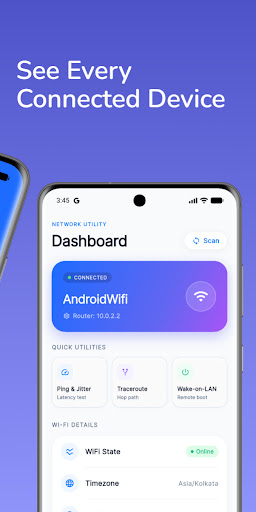
IP Tools: Network Scanner helps you quickly discover and analyze devices connected to your local Wi-Fi network. With a single tap, scan your local network to see online devices along with their IP address, hostname, MAC/vendor details, and reverse DNS information. Key Features • Fast Network Discovery: Scan your local network to discover connected devices quickly. • Device Identification: Identify devices using IP address, hostname, MAC/vendor information, and reverse DNS lookup. • Port Scanner: Check common TCP ports on a selected device to identify accessible network services. • Ping & Latency Tool: Test network latency, packet loss, and connection stability in real time. • Wake-on-LAN (WoL): Remotely wake supported PC or NAS devices on your local network. • Device History & Offline List: View devices detected during previous scans, including devices that are currently offline. • Easy Sharing: Share network scan results via WhatsApp, Email, Notes, or other supported apps. • Privacy Focused: Network scanning is performed locally on your device. No cloud servers, user tracking, or analytics. Who is this app for? Whether you're a network administrator, IT enthusiast, developer, student, or simply want to understand the devices on your home network, IP Tools: Network Scanner provides useful network information in a simple and easy-to-use interface.
More like this
- Top Tools on Google Play by estimated revenue
- IP Tools : Network Scanner alternatives
- IP Tools : Network Scanner vs Spiral Flower Watch Face
- IP Tools : Network Scanner vs 門諾醫院
- All top charts and categories
Similar apps
Spiral Flower Watch FaceezSoft Developers4.5 ★ (39)
門諾醫院台灣基督教門諾會醫療財團法人3.9 ★ (39)
[root] Unlock My AndroidNicolas Lorin3.2 ★ (39)
Clock & AlarmHevin Technoweb Limited3.5 ★ (39)
Wedding CountdownMichael Anthony Melito4.6 ★ (39)
Token2 Companion AppTOKEN24.7 ★ (39)
Xcasca - SSH Client/TerminalNetSarang, Inc.3.0 ★ (39)
IP mapperBigDataCloud.com4.5 ★ (39)