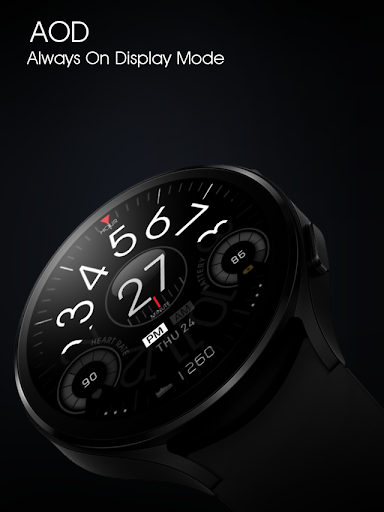
UsA Scalar Watch Face - USA103
USA Design Watch FacePersonalizationGoogle Play$0.99UsA Scalar Watch Face - USA103 revenue and downloads, last 30 days
How we got this (9 inputs)
- signals
- ratings ÷ age
- ratings/day
- 0.02
- monetisation
- stickers ARPD 0.3; no IAP
- bound
- revenue per download ceiling: $15/download × downloads high (Play counter)
- range
- 80% interval from out-of-fold residuals (×1.12 scale, 90 products)
- likelyLow
- 604.85
- likelyHigh
- 1936.94
- confidence
- medium
- observed days (of 30)
- 5
As of Nov 21, 2026.
How we got this (13 inputs)
- signals
- Play installs ÷ age; lifetime→current drift ×/÷4.12 (135278 measured Play counter deltas)
- spread
- measured on downloads ground truth (downloads ground truth: 48 App Store milestones, 33 platform splits, 13 drift points)
- installs
- 3749
- age days
- 1901
- note
- install counter moved once in 2.21 day(s); one step can hold several days of installs, so it is not read as a daily rate yet
- bound
- at most the lifetime installs counter (3749) over 30 days: the listing is 1901 days old, so its last 30 days cannot hold more installs than it ever had
- range scale
- ×0.88 (coverage scale on 9 ground-truth rows; publication is decided before it)
- likelyLow
- 40
- likelyHigh
- 158
- confidence
- medium
- observed days (of 30)
- 5
- measured days
- 0
- scaling
- observed days, scaled to 30
As of Nov 21, 2026.
How we got this (13 inputs)
- method
- installs in the window (all active on install day) + earlier installers active in the month (published retention ÷ the category's DAU/MAU stickiness) + the retained base of installers older than two years
- downloads per day
- 2.67 (0.73 to 9.6, the published worldwide figure)
- retention
- day 1 / 7 / 30: 20.3% / 5.6% / 2.1% (Android benchmark × 1 for the category; AppsFlyer Q3 2024 day-1/7/30 retention, via getstream.io/blog/app-retention-guide (read 2026-11-16); category: OneSignal 2024 day-30 retention by category, via getstream.io/blog/app-retention-guide (read 2026-11-16))
- active days per install
- 5.43 over 730 days (age 1901 days; the curve is used to 730)
- stickiness
- 15% DAU/MAU, Media & Entertainment median (MWM DAU/MAU medians, US iOS, May 2026 (mwm.ai/glossary/dau-mau, read 2026-11-16))
- parts
- window installs 80 (the published 30-day downloads), earlier installers 63, retained base 86
- retained base
- 1802 installers older than 730 days (lifetime from the listing's Play installs counter) × 4.79% active in a month (between 1.63%, the benchmark curve held flat, and 14.1%, median disclosed MAU ÷ lifetime installs of Duolingo, Snapchat and Grindr (company filings, data/ground-truth-active-users.csv; chosen on these rows, scored leave-one-product-out)); range ×/÷2 past each (widened after the leave-one-product-out check)
- spread
- downloads ×/÷3.62, retention ×/÷3, tail ×/÷1.57, stickiness ×/÷1.8, retained base ×/÷5.89 (assumptions; not fitted)
- ratings per download (recorded, not used)
- 0.008289999999999999
- chart persistence (recorded, not used)
- 0 day(s) on a chart in the window; fewer than 7 live days exist
- tier
- modelled: retention and stickiness are published benchmarks, not measured on this listing
- confidence
- low
- rough
- order of magnitude
As of Nov 21, 2026.
Daily active users
Modelled from this app's downloads and a published retention curve for its store and category, not measured. Read it as an order of magnitude.
History
Daily readings as we observed them, last 30 days worldwide. Free shows the last 30 days.
Downloads per day
Observed by us since Nov 16, 2026.
Revenue per day
Observed by us since Nov 16, 2026.
Ratings (worldwide)
Observed by us since Nov 16, 2026.
Installs, Play counter
Observed by us since Nov 16, 2026.
Monthly history: we have found no public-archive copy of this store page from the last 12 months, so monthly readings start with our own in Nov 2026.
Create a free account to save apps; Pro shows full history.
Chart positions
Where this app ranks on the top free, paid and grossing charts we capture.
Search terms
In-app purchases
Prices
In-app purchase ladder, price changes and paywall terms
No in-app prices recorded yet. We read them from the store listing: either this app sells none, or its listing has not been read yet.
Ratings and reviews
Rating distribution
Store histogram
41 ratings
Recent reviews
Marketing
Paid ads, organic videos and onboarding captured for this app.
Paid ads
No Meta, Google or TikTok ads tied to this app yet. We check the public ad libraries daily.
Organic videos
No YouTube, TikTok or Instagram videos tied to this app yet.
Change history
Versions, price changes, rank jumps and listing edits, as we observed them.
Details
- Developer
- USA Design Watch Face, 44 apps
- Package
- com.usadesign.usascalar
- Category
- Personalization
- Price
- $0.99
- Released
- Sep 7, 2021
- Updated
- Oct 29, 2026
- Version
- Not available
- Size
- -
- Content rating
- Everyone
- Website
- Not available
- Contact email
- usawatchface@gmail.com
- Privacy policy
- profilku.com/usadesign/privacypolicy.html
- Languages
- Not available
- Charted in
- United States, India, United Kingdom, Brazil, France
- First seen
- Nov 16, 2026
- Listing read
- Nov 19, 2026
Show store descriptionShow less
Unique design combines analog with digital for Wear OS watch. The hour top section is a circular analog showing time, you can read the minute digital in the center. And also a digital second at the bottom. The time is available only in 12-hour mode. This watch face requires Wear OS API 33+ (Wear OS 4 or newer). Compatible with Galaxy Watch 4/5/6/7/8 Series and newer, Pixel Watch series and other watch face with Wear OS 4 or newer. Make sure you are purchasing using the same Google account registered on your watch. The installation should begin automatically on the watch after a few moments. After the installation is completed on your watch, do these steps to open the watch face on your watch : 1. Open the watch face list on your watch (tap and hold the current watch face) 2. Scroll to the right and tap "add watch face" 3. Scroll down and find new installed watch face in the "downloaded" section Packed with multiple colors combination between hour display and minute display through the "customize" menu. Tap and hold the watch face and go to the "customize" menu (or settings icon under the watch face) to change the styles and also manage the custom shortcut complication. The heart rate synced with S-Health data and you can change the reading interval setting on the S-Health HR setting. Make sure to allow "sensor" permission to be able showing the heart rate. Special designed Always On Display ambient mode. Turn on the Always On Display mode on your watch settings to show a low power display on idle. Please be aware, this feature will use more batteries. Join our Telegram group for live support and discussion https://t.me/usadesignwatchface
More like this
- Top Personalization on Google Play by estimated revenue
- UsA Scalar Watch Face - USA103 alternatives
- UsA Scalar Watch Face - USA103 vs Ballozi GRAVIS Classic
- UsA Scalar Watch Face - USA103 vs Neon Weed Glow Keyboard Backgr
- All top charts and categories
Similar apps
Ballozi GRAVIS ClassicBALLOZI Watch Faces5.0 ★ (42)
Neon Weed Glow Keyboard BackgrFancy keyboard Themes Studio5.0 ★ (42)
RoyalCosme シックなコスメ壁紙きせかえ+HOME by Ateam Entertainment4.0 ★ (42)
Nova DramaTHSolution3.0 ★ (42)
Beach Video Wallpaper RZDOwallpaper rzdo Inc3.5 ★ (42)
AI Charging AnimationAmote Studio3.5 ★ (42)
Bluetooth CamMediaWave Intelligent Communication., Ltd2.3 ★ (42)
Purple Obsidian Icon PackPizzApp Design5.0 ★ (42)