
Ageing TimeLapse - FrameLock
VaiTnsPhotographyGoogle PlayAgeing TimeLapse - FrameLock revenue and downloads, last 30 days
History
Daily readings as we observed them, last 30 days worldwide. Free shows the last 30 days.
One reading so far: history starts Nov 22, 2026, and a trend line appears after the next daily reading.
Monthly history: we have found no public-archive copy of this store page from the last 12 months, so monthly readings start with our own in Nov 2026.
Create a free account to save apps; Pro shows full history.
Chart positions
Where this app ranks on the top free, paid and grossing charts we capture.
Search terms
No search terms read for this app yet. Terms are read from its title and the searches it shows up in, and appear here once ranked.
In-app purchases
Prices
In-app purchase ladder, price changes and paywall terms
No in-app prices recorded yet. We read them from the store listing: either this app sells none, or its listing has not been read yet.
Ratings and reviews
Rating distribution
No rating distribution read yet.
Recent reviews
Marketing
Paid ads, organic videos and onboarding captured for this app.
Paid ads
No Meta, Google or TikTok ads tied to this app yet. We check the public ad libraries daily.
Organic videos
No YouTube, TikTok or Instagram videos tied to this app yet.
Onboarding
No store screenshots, web funnel or in-app recording captured for this app yet.
Change history
Versions, price changes, rank jumps and listing edits, as we observed them.
Details
- Developer
- VaiTns, 3 apps
- Package
- com.vaitns.framelock
- Category
- Photography
- Price
- Free
- Released
- May 17, 2026
- Updated
- Sep 19, 2026
- Version
- 1.1
- Size
- -
- Content rating
- Everyone
- Website
- Not available
- Contact email
- oblakgum@gmail.com
- Languages
- Not available
- Charted in
- United States
- First seen
- Nov 22, 2026
- Listing read
- Nov 22, 2026
Show store descriptionShow less
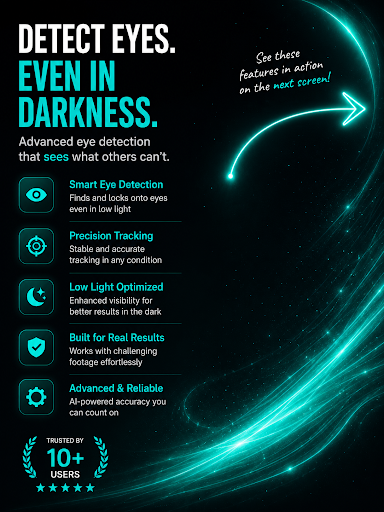
FrameLock: AI-Powered Timelapse Stabilizer Transform your collection of photos into professional-grade, butter-smooth timelapse videos. Whether you’re documenting your own transformation over years, tracking a construction project, or creating a perfectly locked object transition, FrameLock uses advanced AI and Computer Vision to ensure every frame is perfectly aligned. WHO IS IT FOR? The "Photo-a-Day" Enthusiast: Create the ultimate ageing timelapse where your face remains perfectly steady while the years fly by. Content Creators: Make viral "locked-on" object videos where the background changes but the subject never moves a pixel. Travelers & Explorers: Stabilize shots of landmarks, buildings, or landscapes taken at different times or from slightly different angles. Parents & Pet Owners: Document growth with precision, turning thousands of candid shots into a cohesive story. --- KEY STABILIZATION MODES 1. Ageing Timelapse (AI Face Lock) Using sophisticated facial landmark detection, FrameLock identifies eye positions to align faces with surgical precision. How it works: Simply pick a reference photo, and the AI automatically rotates, scales, and pans every other image to match. Advanced Tracking: If the AI picks the wrong person in a crowded shot, you can manually select the correct face to keep the sequence perfect. 2. Select Object (Auto-Tracking) Lock onto *anything*—a window, a logo, a mountain peak, or a piece of furniture. AI Feature Matching: Uses SIFT technology to "fingerprint" your selected object and find it in every subsequent frame, even if the lighting or environment changes. Tighter Selection: Draw a custom ROI (Region of Interest) box to tell the AI exactly what matters. 3. Full Manual Alignment For the ultimate perfectionist or shots that challenge even the best AI. Pro Tools: Use a virtual D-pad for precise panning, fine-tuned rotation, and incremental scaling. Difference Blend Mode: A powerful overlay tool that highlights misalignments in real-time. When the matching areas turn black, you know you’ve hit the sweet spot. --- POWERFUL FEATURES 1. 4K Export Quality: Save your masterpieces in high-definition, Full HD, or stunning 4K resolution. 2. Custom Frame Rates: From a slow, cinematic 1 FPS to a high-speed 60 FPS (or even custom values up to 240 FPS for ultra-smooth playback). 3. Background Filling: Choose between a sleek black background, a modern blurred-edge look, or transparent for further editing. 4. Aspect Ratio Control: Export in 16:9 (YouTube), 4:3, or the original photo ratio. 5. Project Management: Keep track of multiple timelapses at once. See your "Day Streak" and total frame counts at a glance on the dashboard. 6. Bulk Import: Add entire folders at once or pick individual gems from your gallery. WHY FRAMELOCK? Standard video stabilizers are designed for shaky camera movement. FrameLock is built for *photo sequences*. It understands that your photos might have been taken days, weeks, or years apart. By locking onto specific features instead of generic motion, FrameLock provides a level of stability that traditional editing software simply can't match on a mobile device. Stop scrolling through your gallery and start telling your story. Download FrameLock today and lock in your legacy.**




More like this
- Top Photography on Google Play by estimated revenue
- Ageing TimeLapse - FrameLock alternatives
- Ageing TimeLapse - FrameLock vs YoungPhoto - Aesthetic Camera
- Ageing TimeLapse - FrameLock vs GIKA - Vintage Phone Cam
- All top charts and categories
Similar apps
YoungPhoto - Aesthetic CameraImagine_Works
GIKA - Vintage Phone CamNoahProject Inc.
SANGSANGLYEOG iY2K상상력
IPTV Smart Player - Live TVOxylab Studio
AI Photo Effects: Face EditorINFINITE HILLS PRODUCTIONS INC
MySafeFrameSafe Frame Technologies FZCO
AI Face Editor: Photo StudioLeilani Rogers
Velora: AI Photo & VideoPIZZA DI LUNA, LLC