
Gesture Control
Indroid StudioProductivityGoogle PlayContains adsGesture Control revenue and downloads, last 30 days
History
Daily readings as we observed them, last 30 days worldwide. Free shows the last 30 days.
One reading so far: history starts Nov 23, 2026, and a trend line appears after the next daily reading.
Monthly history: we have found no public-archive copy of this store page from the last 12 months, so monthly readings start with our own in Nov 2026.
Create a free account to save apps; Pro shows full history.
Chart positions
Where this app ranks on the top free, paid and grossing charts we capture.
Search terms
No search terms read for this app yet. Terms are read from its title and the searches it shows up in, and appear here once ranked.
In-app purchases
Prices
In-app purchase ladder, price changes and paywall terms
No in-app prices recorded yet. We read them from the store listing: either this app sells none, or its listing has not been read yet.
Ratings and reviews
Rating distribution
Store histogram
359 ratings
Recent reviews
Marketing
Paid ads, organic videos and onboarding captured for this app.
Paid ads
No Meta, Google or TikTok ads tied to this app yet. We check the public ad libraries daily.
Organic videos
No YouTube, TikTok or Instagram videos tied to this app yet.
Onboarding
No store screenshots, web funnel or in-app recording captured for this app yet.
Change history
Versions, price changes, rank jumps and listing edits, as we observed them.
Details
- Developer
- Indroid Studio, 4 apps
- Package
- com.vikas.gesture
- Category
- Productivity
- Price
- Free
- Released
- Dec 5, 2013
- Updated
- Mar 5, 2015
- Version
- 2.0
- Size
- -
- Content rating
- Everyone
- Website
- Not available
- Contact email
- indroidstudio@gmail.com
- Languages
- Not available
- Charted in
- United States
- First seen
- Nov 23, 2026
- Listing read
- Nov 23, 2026
Show store descriptionShow less
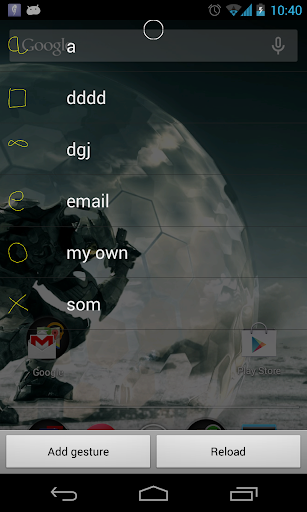
Thank YOU for the immense support and appreciation. The little app turns an year. Cheers! *** We have released the AD Free version. Check out below for "Gesture Control Pro" ** NOTE: Long press on the overlay circle to activate the application. Then swipe right to open the Notification Drawer and add all the gestures you want. After that attach them to the application by long pressing on the Gesture from the displayed list. “Gesture Control ” aims to provide a multi-tasking solution that allows the user to quickly open/ switch to applications that have been predefined by him/her. The application opening process will be gesture based. It means the user will have to draw a symbol on the screen to open the corresponding application. The user has to first save this symbol in the application and associate it with application intent before using this functionality. Gesture drawing takes a fraction of a second as compared to the cumbersome process of searching for the application in the phone and then opening it. Use it to increase your productivity and speed in navigating through various applications. This application is still being tested for all devices so please comment if you face any problem ( mention your phone model and OS version too) . Also provide suggestions as to what functions you would like to see incorporated in this application. UPDATE: Version 6 will now feature extra information dialog box and some preferences. List of preferences: 1. Change the color of the overlay ring: White, Black or Transparent 2. Change Notification display icon 3. Change position of Overlay Ring: Top , Right , Left Enjoy!



More like this
- Top Productivity on Google Play by estimated revenue
- Gesture Control alternatives
- Gesture Control vs PDFEdit: Reader & Viewer Pro
- Gesture Control vs Pork Farm Control
- All top charts and categories
Similar apps
PDFEdit: Reader & Viewer ProZamanIT3.5 ★ (359)
Pork Farm ControlJulian ramos5.0 ★ (359)
The Smart Work Order appSimple Simon (c)3.3 ★ (359)
Neat Clean ProMr.Appp.864.4 ★ (360)
Uninstaller ProRhythm Software4.2 ★ (360)
MemoSpeo: Tasks & RemindersRany82 Developer4.7 ★ (360)
FAAC Simply ConnectFAAC SpA
Minha OnlineOnline Telecom