
Digital Watch face D33
VG FacesPersonalizationGoogle Play$1.59Digital Watch face D33 revenue and downloads, last 30 days
History
Daily readings as we observed them, last 30 days worldwide. Free shows the last 30 days.
One reading so far: history starts Nov 23, 2026, and a trend line appears after the next daily reading.
Monthly history: we have found no public-archive copy of this store page from the last 12 months, so monthly readings start with our own in Nov 2026.
Create a free account to save apps; Pro shows full history.
Chart positions
Where this app ranks on the top free, paid and grossing charts we capture.
Search terms
No search terms read for this app yet. Terms are read from its title and the searches it shows up in, and appear here once ranked.
In-app purchases
Prices
In-app purchase ladder, price changes and paywall terms
No in-app prices recorded yet. We read them from the store listing: either this app sells none, or its listing has not been read yet.
Ratings and reviews
Rating distribution
No rating distribution read yet.
Recent reviews
Marketing
Paid ads, organic videos and onboarding captured for this app.
Paid ads
No Meta, Google or TikTok ads tied to this app yet. We check the public ad libraries daily.
Organic videos
No YouTube, TikTok or Instagram videos tied to this app yet.
Onboarding
No store screenshots, web funnel or in-app recording captured for this app yet.
Change history
Versions, price changes, rank jumps and listing edits, as we observed them.
Details
- Developer
- VG Faces, 58 apps
- Package
- com.watchfacestudio.d33
- Category
- Personalization
- Price
- $1.59
- Released
- May 26, 2026
- Updated
- Aug 10, 2026
- Version
- Not available
- Size
- -
- Content rating
- Everyone
- Website
- Not available
- Contact email
- volder83@gmail.com
- Privacy policy
- sites.google.com/view/vg-app/digital-watch-face-d33
- Languages
- Not available
- Charted in
- United States
- First seen
- Nov 23, 2026
- Listing read
- Nov 23, 2026
Show store descriptionShow less
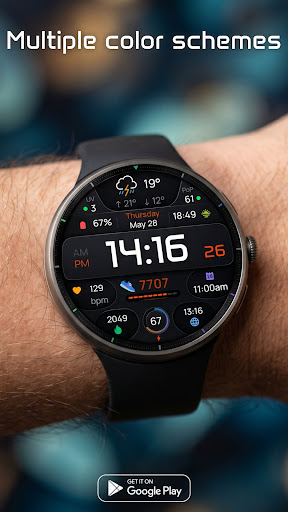
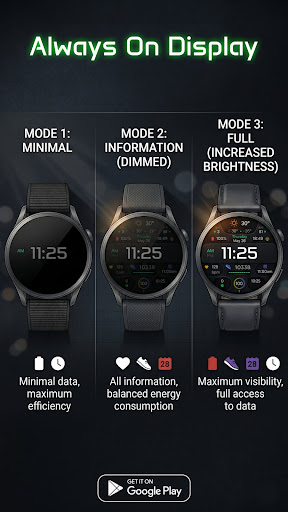
D33: Advanced Weather & Data Watch Face Maximize your smartwatch capabilities with the D33 Digital Watch Face for Wear OS. This highly informative face is designed for data lovers, offering advanced weather tracking, unmatched display customization, and a multi-tier Always-On Display. Key Features: • Advanced Weather Dashboard: Get all your forecast details at a glance. The dedicated weather section displays minimum & maximum temperatures, Day & Night icons, the Ultraviolet (UV) index, and your chance of precipitation. • 6 Customizable Complications: Tailor the layout to your exact needs. Fill the 6 available slots with your most critical daily data, such as step counts, heart rate, or calendar events. • Multiple Color Schemes: Match your watch face to your style effortlessly with a wide selection of vibrant color combinations. • Innovative 3-Mode AOD: Take total control over your battery life and visibility with three distinct Always-On Display modes: - Mode 1 (Minimal): Minimal data for maximum battery efficiency. - Mode 2 (Information - Dimmed): Shows all information with balanced energy consumption. - Mode 3 (Full - Increased Brightness): Maximum visibility giving you full access to data at all times. Smart Shortcut System (4 Tap Zones): Navigate your smartwatch effortlessly with intuitive tap zones: • Tap Time: Quick access to Alarm functions. • Tap Date: Opens your Calendar. • Tap Battery: Opens Battery status. • Tap Weather Icon: Customizable App Shortcut (Set it to open your favorite weather app or any other tool). Installation: 1. Ensure your watch is connected via Bluetooth. 2. Download D33 from the Google Play Store. 3. Long-press your watch screen, scroll to the end, and select "D33" to apply. Compatibility: Designed exclusively for Wear OS 5+ devices, including: • Samsung Galaxy Watch 8 & Ultra • Google Pixel Watch 4 • And other newer devices running Wear OS 5 or higher.


More like this
- Top Personalization on Google Play by estimated revenue
- Digital Watch face D33 alternatives
- Digital Watch face D33 vs SamWatch Digital Themis 2024
- Digital Watch face D33 vs [69D] Virtue Analog Watch
- All top charts and categories
Similar apps
SamWatch Digital Themis 2024Samtree
[69D] Virtue Analog Watch69 Design
Breitling Premier Watch FacePrestige Watch Faces Studio
BLZ SEAVOR - Diver Watch FaceBALLOZI Watch Faces
Verge Watch Faceamoledwatchfaces™
Node N1 Analog Watch FaceFutorum
JJ Carbon GT Watch FaceJJ-Design
BREITLING AVENGER Watch FaceLIBERTY WATCH FACES™