SD138
SpeedydesignPersonalizationGoogle Play$0.99SD138 revenue and downloads, last 30 days
How we got this (13 inputs)
- signals
- Play installs ÷ age; lifetime→current drift ×/÷4.12 (135278 measured Play counter deltas)
- spread
- measured on downloads ground truth (downloads ground truth: 48 App Store milestones, 33 platform splits, 13 drift points)
- installs
- 2
- age days
- 780
- bound
- at most the lifetime installs counter (2) over 30 days: the listing is 780 days old, so its last 30 days cannot hold more installs than it ever had
- range scale
- ×0.88 (coverage scale on 9 ground-truth rows; publication is decided before it)
- likelyLow
- 0
- likelyHigh
- 0
- confidence
- low
- rough
- order of magnitude
- observed days (of 30)
- 2
- measured days
- 0
- scaling
- observed days, scaled to 30
As of Nov 21, 2026.
Active users: not estimated for this app (the published downloads figure is under one install a month).
History
Daily readings as we observed them, last 30 days worldwide. Free shows the last 30 days.
One reading so far: history starts Nov 19, 2026, and a trend line appears after the next daily reading.
Downloads per day
Observed by us since Nov 19, 2026.
Monthly history: we have found no public-archive copy of this store page from the last 12 months, so monthly readings start with our own in Nov 2026.
Create a free account to save apps; Pro shows full history.
Chart positions
Where this app ranks on the top free, paid and grossing charts we capture.
Search terms
No search terms read for this app yet. Terms are read from its title and the searches it shows up in, and appear here once ranked.
In-app purchases
Prices
In-app purchase ladder, price changes and paywall terms
No in-app prices recorded yet. We read them from the store listing: either this app sells none, or its listing has not been read yet.
Ratings and reviews
Rating distribution
No rating distribution read yet.
Recent reviews
Marketing
Paid ads, organic videos and onboarding captured for this app.
Paid ads
No Meta, Google or TikTok ads tied to this app yet. We check the public ad libraries daily.
Organic videos
No YouTube, TikTok or Instagram videos tied to this app yet.
Change history
Versions, price changes, rank jumps and listing edits, as we observed them.
Details
- Developer
- Speedydesign, 42 apps
- Package
- com.watchfacestudio.sd138
- Category
- Personalization
- Price
- $0.99
- Released
- Oct 2, 2024
- Updated
- Aug 11, 2026
- Version
- 1.0.0
- Size
- -
- Content rating
- Everyone
- Website
- speedydesign.it
- Contact email
- support@speedydesign.it
- Privacy policy
- speedydesign.it/privacy
- Languages
- Not available
- Charted in
- United States
- First seen
- Nov 19, 2026
- Listing read
- Nov 19, 2026
Show store descriptionShow less
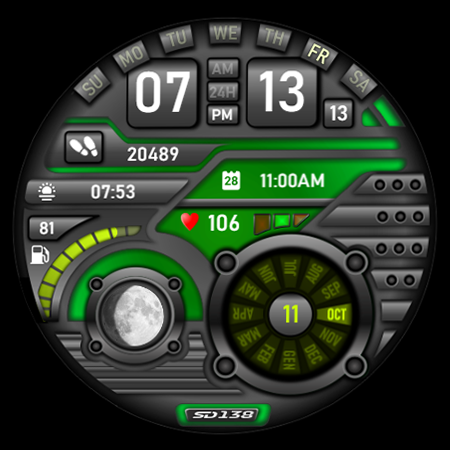
Sports digital dial, contains: 4 shortcuts customizable, 2 customizable complications where you can have the data you prefer such as weather, barometer, distance traveled, calories, UV index, probability of rain and much more. INSTALLATION NOTES: Please check this link for installation and troubleshooting guide: https://speedydesign.it/installazione This watch face supports all Wear OS devices. Description: • Digital time (12/24 hours based on phone settings) • Day of the week • Battery level + percentage • Steps count • Heart rate + intervals •Day and month •Moon phase • Complication • Shortcut • AOD Customizable: x 10 Background Colors x 10 Text Colors x 02 Complications x 04 Shortcut Dial customization: 1 - Touch and hold the display 2 - Tap on the Customize option Dial Complications: you can customize the dial with all the data you want. For example, you can select weather, heart rate, barometer etc. Notes on heart rate: The watch face does not automatically measure and does not automatically display the heart rate result when installed. To see current heart rate data on the dials, you will need to take a manual measurement. To do this, tap the heart rate display area. Wait a few seconds. The dial will take a measurement and display the current result. Make sure you enabled the use of sensors when you installed the watch face, otherwise swap it with another watch face and then go back to this one to enable the sensors. After the first manual measurement, the dial can automatically measure your heart rate every 10 minutes. Manual measurement will also be possible. (Some features may not be available on some watches). STAY TUNED: newsletter@speedydesign.it SPEEDYDESIGN: https://www.speedydesign.it FACEBOOK: https://www.facebook.com/Speedy-Design-117708058358665 INSTAGRAM: https://www.instagram.com/speedydesign.ita/ LNK BIO https://lnk.bio/speedydesign Thank you !
More like this
- Top Personalization on Google Play by estimated revenue
- SD138 alternatives
- SD138 vs SamWatch Digital Themis 2024
- SD138 vs [69D] Virtue Analog Watch
- All top charts and categories
Similar apps
SamWatch Digital Themis 2024Samtree
[69D] Virtue Analog Watch69 Design
Breitling Premier Watch FacePrestige Watch Faces Studio
BLZ SEAVOR - Diver Watch FaceBALLOZI Watch Faces
Verge Watch Faceamoledwatchfaces™
Node N1 Analog Watch FaceFutorum
JJ Carbon GT Watch FaceJJ-Design
BREITLING AVENGER Watch FaceLIBERTY WATCH FACES™