
Vectora Axis Watch Face
Pars Watch FacesPersonalizationGoogle Play$0.99Vectora Axis Watch Face revenue and downloads, last 30 days
How we got this (7 inputs)
- signals
- paid price × downloads (paid sales only; in-app purchases not counted)
- method
- paid sales only; in-app purchases not counted
- range
- 80% interval from out-of-fold residuals (×1.12 scale, 90 products)
- likelyLow
- 11.17
- likelyHigh
- 42
- confidence
- medium
- observed days (of 30)
- 3
As of Nov 21, 2026.
How we got this (13 inputs)
- signals
- Play installs ÷ age; lifetime→current drift ×/÷4.12 (135278 measured Play counter deltas)
- spread
- measured on downloads ground truth (downloads ground truth: 48 App Store milestones, 33 platform splits, 13 drift points)
- installs
- 82
- age days
- 128
- note
- install counter did not move in 2.57 day(s); the counter moves in steps, so this is not read as zero
- bound
- at most the lifetime installs counter (82) over 30 days: the listing is 128 days old, so its last 30 days cannot hold more installs than it ever had
- range scale
- ×0.88 (coverage scale on 9 ground-truth rows; publication is decided before it)
- likelyLow
- 11
- likelyHigh
- 39
- confidence
- medium
- observed days (of 30)
- 3
- measured days
- 0
- scaling
- observed days, scaled to 30
As of Nov 21, 2026.
How we got this (12 inputs)
- method
- installs in the window (all active on install day) + earlier installers active in the month (published retention ÷ the category's DAU/MAU stickiness) + the retained base of installers older than two years
- downloads per day
- 0.73 (0.2 to 1.9, the published worldwide figure)
- retention
- day 1 / 7 / 30: 20.3% / 5.6% / 2.1% (Android benchmark × 1 for the category; AppsFlyer Q3 2024 day-1/7/30 retention, via getstream.io/blog/app-retention-guide (read 2026-11-16); category: OneSignal 2024 day-30 retention by category, via getstream.io/blog/app-retention-guide (read 2026-11-16))
- active days per install
- 3.06 over 128 days
- stickiness
- 15% DAU/MAU, Media & Entertainment median (MWM DAU/MAU medians, US iOS, May 2026 (mwm.ai/glossary/dau-mau, read 2026-11-16))
- parts
- window installs 22 (the published 30-day downloads), earlier installers 6, retained base 0
- spread
- downloads ×/÷3.08, retention ×/÷3, tail ×/÷1.3, stickiness ×/÷1.8 (assumptions; not fitted)
- chart persistence (recorded, not used)
- 0 day(s) on a chart in the window; fewer than 7 live days exist
- bound
- at most the listing's 82 lifetime installs
- tier
- modelled: retention and stickiness are published benchmarks, not measured on this listing
- confidence
- low
- rough
- order of magnitude
As of Nov 21, 2026.
Daily active users
Modelled from this app's downloads and a published retention curve for its store and category, not measured. Read it as an order of magnitude.
History
Daily readings as we observed them, last 30 days worldwide. Free shows the last 30 days.
Downloads per day
Observed by us since Nov 18, 2026.
Revenue per day
Observed by us since Nov 18, 2026.
Installs, Play counter
Observed by us since Nov 18, 2026.
Monthly history: we have found no public-archive copy of this store page from the last 12 months, so monthly readings start with our own in Nov 2026.
Create a free account to save apps; Pro shows full history.
Chart positions
Where this app ranks on the top free, paid and grossing charts we capture.
Search terms
No search terms read for this app yet. Terms are read from its title and the searches it shows up in, and appear here once ranked.
In-app purchases
Prices
In-app purchase ladder, price changes and paywall terms
No in-app prices recorded yet. We read them from the store listing: either this app sells none, or its listing has not been read yet.
Ratings and reviews
Rating distribution
No rating distribution read yet.
Recent reviews
Marketing
Paid ads, organic videos and onboarding captured for this app.
Paid ads
No Meta, Google or TikTok ads tied to this app yet. We check the public ad libraries daily.
Organic videos
No YouTube, TikTok or Instagram videos tied to this app yet.
Onboarding
No store screenshots, web funnel or in-app recording captured for this app yet.
Change history
Versions, price changes, rank jumps and listing edits, as we observed them.
Details
- Developer
- Pars Watch Faces, 46 apps
- Package
- com.watchfacestudio.vectoraaxis
- Category
- Personalization
- Price
- $0.99
- Released
- Jul 16, 2026
- Updated
- Oct 5, 2026
- Version
- Not available
- Size
- -
- Content rating
- Everyone
- Website
- www.parswatchfaces.com
- Contact email
- parswatchfaces@gmail.com
- Privacy policy
- www.parswatchfaces.com/privacy-policy-2/
- Languages
- Not available
- Charted in
- United States
- First seen
- Nov 18, 2026
- Listing read
- Nov 21, 2026
Show store descriptionShow less
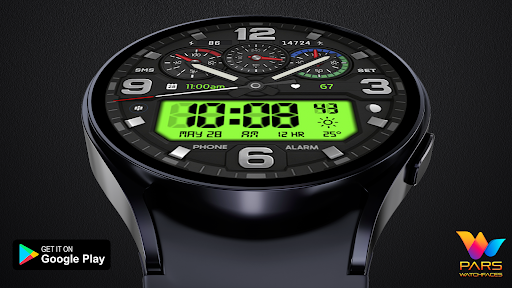
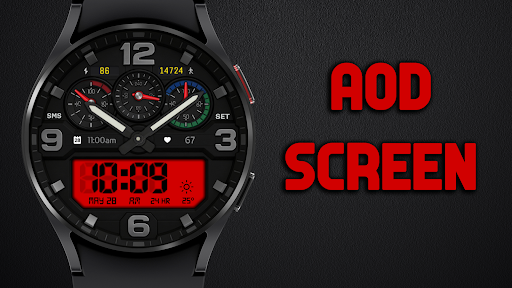
Built for Wear OS, this hybrid design blends classic analog elegance with essential digital performance metrics — giving you instant access to what truly matters. 🔥 Key Features: 🎨 25 Vivid Background Colors ⚙️ 2 Custom Complication ⌚ Hybrid Design 🌤 Weather Information 🔋 Battery Percentage 👣 Step Counter ❤️ Heart Rate Monitor Vectora Axis Watch Face is compatible with all watches using Wear OS SDK 34 and Api 34+. IMPORTANT NOTE: The companion application installed on your phone is for informational purposes only. The watch face will be automatically installed on your watch. All you need to do is activate the Always Set Watch Face section from the settings menu in the Play Store application on your watch. This will automatically bring the watch face to your home screen. For more information, please check the link below. https://www.parswatchfaces.com/set/ PLEASE NOTE: In some watch brands and models, functions specific to Samsung Galaxy series watches may not work. * Please check the pictures of the watch face for more information. NOTES: - Make sure you have allowed the access sensors. - Step target set to 10k. - Turning on the pedometer by clicking on the Pedometer text may not work on some watch models other than Samsung watch models. - This watch face is compatible with Samsung Galaxy Watch 4,Watch 5, Watch 6, Watch 7, Pixel Watch etc.It supports all Wear OS devices with API Level 30+. ISTALLING NOTES: 1 - Make sure the watch is properly connected to the phone. The Phone app just acts as a placeholder to make it easy to set up and find the watch face on your Wear OS watch PS: If you get stuck in the payment cycle, don't worry, only one payment will be made even if you are asked to pay a second time. Wait 5 minutes or restart your watch and try again. There may be a synchronization issue between your device and Google servers. or 2 - Alternatively, try to install the watch face from the web browser on your PC. PS: While installing the watch face, the developer has no any control about the installation. Before writing a negative comment or giving 1 star rating please read the Installation Guide carefully in the link below and please contact us via e-mail if you get any other problem. https://www.parswatchfaces.com/installation-guide/ NOTE :If you get the message "Your devices are not compatible" instead of app on phone, please use Play Store in WEB browser from PC or Laptop. IMPORTANT NOTICE : After installation, the watch face can load the last heart rate measurement result, but it doesn't have to. The watch face does not automatically measure and does not automatically display the heart rate result. To view your current heart rate score, you'll need to take a manual measurement. To do this, sit still, wait a few minutes and click on the heart rate display area. Wait a few seconds. The watch face will take a measurement and display the current result. Do this whenever you want to see your current heart rate. MY WATCH FACES CATALOG https://play.google.com/store/apps/dev?id=7655501335678734997 FOLLOW US : FACEBOOK https://www.facebook.com/profile.php?id=100078915463662 INSTAGRAM https://www.instagram.com/parswf/ TELEGRAM https://t.me/parswatchfaces if you have any question, please contact with me: info@parswatchfaces.com I would be very grateful for the rate and review in the Store. Thanks.




More like this
- Top Personalization on Google Play by estimated revenue
- Vectora Axis Watch Face alternatives
- Vectora Axis Watch Face vs SamWatch Digital Themis 2024
- Vectora Axis Watch Face vs [69D] Virtue Analog Watch
- All top charts and categories
Similar apps
SamWatch Digital Themis 2024Samtree
[69D] Virtue Analog Watch69 Design
Breitling Premier Watch FacePrestige Watch Faces Studio
BLZ SEAVOR - Diver Watch FaceBALLOZI Watch Faces
Verge Watch Faceamoledwatchfaces™
Node N1 Analog Watch FaceFutorum
JJ Carbon GT Watch FaceJJ-Design
BREITLING AVENGER Watch FaceLIBERTY WATCH FACES™