KeyTrigger
StrAIProductivityGoogle Play$1.95KeyTrigger revenue and downloads, last 30 days
How we got this (7 inputs)
- signals
- paid price × downloads (paid sales only; in-app purchases not counted)
- method
- paid sales only; in-app purchases not counted
- range
- 80% interval from out-of-fold residuals (×1.12 scale, 90 products)
- likelyLow
- 1.79
- likelyHigh
- 7.94
- confidence
- medium
- observed days (of 30)
- 2
As of Nov 21, 2026.
How we got this (13 inputs)
- signals
- Play installs ÷ age; lifetime→current drift ×/÷4.12 (135278 measured Play counter deltas)
- spread
- measured on downloads ground truth (downloads ground truth: 48 App Store milestones, 33 platform splits, 13 drift points)
- installs
- 186
- age days
- 4727
- note
- install counter did not move in 2.28 day(s); the counter moves in steps, so this is not read as zero
- bound
- at most the lifetime installs counter (186) over 30 days: the listing is 4727 days old, so its last 30 days cannot hold more installs than it ever had
- range scale
- ×0.88 (coverage scale on 9 ground-truth rows; publication is decided before it)
- likelyLow
- 1
- likelyHigh
- 4
- confidence
- medium
- observed days (of 30)
- 2
- measured days
- 0
- scaling
- observed days, scaled to 30
As of Nov 21, 2026.
How we got this (12 inputs)
- method
- installs in the window (all active on install day) + earlier installers active in the month (published retention ÷ the category's DAU/MAU stickiness) + the retained base of installers older than two years
- downloads per day
- 0.07 (0 to 0.23, the published worldwide figure)
- retention
- day 1 / 7 / 30: 24.81% / 6.84% / 2.57% (Android benchmark × 1.22 for the category; AppsFlyer Q3 2024 day-1/7/30 retention, via getstream.io/blog/app-retention-guide (read 2026-11-16); category: OneSignal 2024 day-30 retention by category, via getstream.io/blog/app-retention-guide (read 2026-11-16))
- active days per install
- 6.52 over 730 days (age 4727 days; the curve is used to 730)
- stickiness
- 17.5% DAU/MAU, Productivity & Tools median (MWM DAU/MAU medians, US iOS, May 2026 (mwm.ai/glossary/dau-mau, read 2026-11-16))
- parts
- window installs 2 (the published 30-day downloads), earlier installers 2, retained base 7
- retained base
- 137 installers older than 730 days (lifetime from the listing's Play installs counter) × 4.9% active in a month (between 1.71%, the benchmark curve held flat, and 14.1%, median disclosed MAU ÷ lifetime installs of Duolingo, Snapchat and Grindr (company filings, data/ground-truth-active-users.csv; chosen on these rows, scored leave-one-product-out)); range ×/÷2 past each (widened after the leave-one-product-out check)
- spread
- downloads ×/÷100, retention ×/÷3, tail ×/÷1.58, stickiness ×/÷1.8, retained base ×/÷5.76 (assumptions; not fitted)
- chart persistence (recorded, not used)
- 0 day(s) on a chart in the window; fewer than 7 live days exist
- tier
- modelled: retention and stickiness are published benchmarks, not measured on this listing
- confidence
- low
- rough
- order of magnitude
As of Nov 21, 2026.
Daily active users
Modelled from this app's downloads and a published retention curve for its store and category, not measured. Read it as an order of magnitude.
History
Daily readings as we observed them, last 30 days worldwide. Free shows the last 30 days.
Downloads per day
Observed by us since Nov 19, 2026.
Revenue per day
Observed by us since Nov 19, 2026.
Installs, Play counter
Observed by us since Nov 19, 2026.
Monthly history: we have found no public-archive copy of this store page from the last 12 months, so monthly readings start with our own in Nov 2026.
Create a free account to save apps; Pro shows full history.
Chart positions
Where this app ranks on the top free, paid and grossing charts we capture.
Search terms
No search terms read for this app yet. Terms are read from its title and the searches it shows up in, and appear here once ranked.
In-app purchases
Prices
In-app purchase ladder, price changes and paywall terms
No in-app prices recorded yet. We read them from the store listing: either this app sells none, or its listing has not been read yet.
Ratings and reviews
Rating distribution
No rating distribution read yet.
Recent reviews
Marketing
Paid ads, organic videos and onboarding captured for this app.
Paid ads
No Meta, Google or TikTok ads tied to this app yet. We check the public ad libraries daily.
Organic videos
No YouTube, TikTok or Instagram videos tied to this app yet.
Change history
Versions, price changes, rank jumps and listing edits, as we observed them.
Details
- Developer
- StrAI, 3 apps
- Package
- com.x0.strai.keytrigger
- Category
- Productivity
- Price
- $1.95
- Released
- Dec 12, 2013
- Updated
- Oct 6, 2025
- Version
- 1.4
- Size
- -
- Content rating
- Everyone
- Website
- strai.x0.com
- Contact email
- support@strai.x0.com
- Privacy policy
- strai.x0.com/privacypolicy-keytrigger
- Languages
- Not available
- Charted in
- United States
- First seen
- Nov 19, 2026
- Listing read
- Nov 21, 2026
Show store descriptionShow less
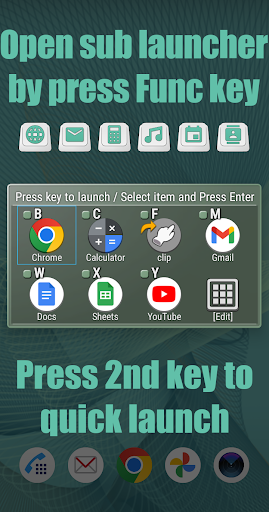
Bluetooth Keyboard becomes a remote app launcher. Assign apps to the keys on keyboard, to launch them by pressing a single or a pair of keys. - Launch app / trigger shortcut / show sub launcher by each app-launch "Func" key - Use Windows* key as browser Func key - Set key assignment in sub launcher for second trigger *Left-meta key will be replaced by bundled key map (layout) Usage Example - Launch memo app instantly, anytime you get ideas. - Trigger voice recognition app on remote tablet. - Trigger shortcut of automation tool such as FRep series remotely. Initial Settings (see images) 1. Pair (connect) the Bluetooth keyboard to your Android. 2. Push either of app-launch Func keys; Browser, Calculator, Calendar, Contacts, Mail, Music. On Android 8~, combination with Meta key (Meta-B for browser, etc.) also available. 3. If "Complete action using" popup is shown, choose KeyTrigger. If any key does not show the popup, try setting below (Win->Web) keyboard layout. 4. In green frame dialog, push Enter or tap "Tap here and setup default app for trigger key" at the top. 5. Again, you will see "Complete action using" popup, and in this time, Select KeyTrigger with Always. Now you can launch KeyTrigger by pushing the app-launch Func key. Features - Selectable Direct Launch, Second Key, or Unused for each app-launch Func key. Direct Launch: start designated app/shortcut instantly when the app-launch Func key pushed. Second Key: register multiple apps and shortcuts for sub launcher palette, which popup when the app-launch Func key pushed. - Unused: disable KeyTrigger app for the app-launch Func key, to remove from app candidate list. - Color variation of frame. (Win->Web) keyboard layout (Android 4.1 or later) If your keyboard has Windows key (or Left-meta key), bundled key layout can replace it with Browser app-launch Func key by steps below. 1. Pair (connect) your Bluetooth keyboard to Android. 2. Open Android Settings screen and select Language & input. 3. In Physical Keyboard section of Language & input screen, tap (your keyboard name). 4. In Choose keyboard layout popup, push Set up keyboard layouts. 5. In Keyboard layouts list, you can see (Win->Web) **** with (KeyTrigger) Android keyboard, and check one of them, then Back. 6. If the Choose keyboard layout popup says, "To switch, press Control-Spacebar" or such, do it to switch the keyboard layout to checked one. Then Back. 7. Now you can see the checked layout name under your keyboard name. 8. Try pushing your Windows (or Left-meta) key, which will popup browsers. Then go to step 4. in Initial Settings above. Permissions - Run at startup: availability setting of activity for UNUSED app-launch key. Requirements - Android 4.0.3 or later - Physical keyboard (Bluetooth, usb, built-in or other) If you have any question or request, please mail to us. The reply will be in English. == DISCLAIMER == THIS SOFTWARE AND THE ACCOMPANYING FILES ARE DISTRIBUTED and SOLD "AS IS" AND WITHOUT WARRANTIES AS TO PERFORMANCE OR MERCHANTABILITY OR ANY OTHER WARRANTIES WHETHER EXPRESSED OR IMPLIED. LICENSEE USES THE SOFTWARE AT HIS/HER OWN RISK. NO LIABILITY FOR CONSEQUENTIAL DAMAGES. ================
More like this
- Top Productivity on Google Play by estimated revenue
- KeyTrigger alternatives
- KeyTrigger vs PDF Reader: View Documents
- KeyTrigger vs Smart Transfer: Copy My Data
- All top charts and categories
Similar apps
PDF Reader: View DocumentsCrow Drama Studio
Smart Transfer: Copy My DataDigiGen Apps
Smart Switch App File TransferCoddeX Studio
AI Voice Changer: TTSMatechmobile Global
AI Translate: Voice & CameraSING HUI PTE. LTD.
PDF Reader: Converter & EditorStyle Of Me - VTN Global
Clean TurboFreeTree Studio
PDF Reader & Document ViewerOSIAS CAPITAL