
Karnaugh Map Solver
XortaliusEducationGoogle PlayKarnaugh Map Solver revenue and downloads, last 30 days
History
Daily readings as we observed them, last 30 days worldwide. Free shows the last 30 days.
One reading so far: history starts Nov 22, 2026, and a trend line appears after the next daily reading.
Monthly history: we have found no public-archive copy of this store page from the last 12 months, so monthly readings start with our own in Nov 2026.
Create a free account to save apps; Pro shows full history.
Chart positions
Where this app ranks on the top free, paid and grossing charts we capture.
Search terms
No search terms read for this app yet. Terms are read from its title and the searches it shows up in, and appear here once ranked.
In-app purchases
Prices
In-app purchase ladder, price changes and paywall terms
No in-app prices recorded yet. We read them from the store listing: either this app sells none, or its listing has not been read yet.
Ratings and reviews
Rating distribution
No rating distribution read yet.
Recent reviews
Marketing
Paid ads, organic videos and onboarding captured for this app.
Paid ads
No Meta, Google or TikTok ads tied to this app yet. We check the public ad libraries daily.
Onboarding
No store screenshots, web funnel or in-app recording captured for this app yet.
Change history
Versions, price changes, rank jumps and listing edits, as we observed them.
Details
- Developer
- Xortalius, 40 apps
- Package
- com.xorcalc.karnaugh_map_solver
- Category
- Education
- Price
- Free
- Released
- Dec 2, 2024
- Updated
- Mar 17, 2026
- Version
- 1.0.3
- Size
- -
- Content rating
- Everyone
- Contact email
- info@calculadorasonline.com
- Languages
- Not available
- Charted in
- United States
- First seen
- Nov 22, 2026
- Listing read
- Nov 22, 2026
Show store descriptionShow less
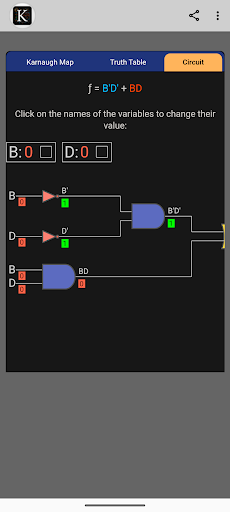
The Karnaugh Map Solver app, also known as KMap Solver, is a comprehensive tool designed to simplify Karnaugh maps with up to 5 variables, streamline Boolean functions, and analyze their behavior in various representations. With its user-friendly interface, this app guides you step-by-step through the entire process. How to Use Karnaugh Map Solver: Select the canonical form: Choose how you want to represent the Boolean function: Sum of Products (minterms): Highlights combinations where the output is 1. Product of Sums (maxterms): Focuses on combinations where the output is 0. Specify the number of variables: Define the number of variables in your Boolean function. The app supports Karnaugh maps from 2 to 5 variables. Customize variable names: Assign custom names to your variables. By default, the variables are labeled [A, B, C, D, E], but you can personalize them as needed. Configure values in the map: In the generated grid, click on the squares to toggle values between 0, 1, and X as required. Once you’ve set all the combinations, the simplified Boolean function will automatically display at the top. Access the truth table: Use the "Truth Table" tab to view and edit all possible variable combinations. Changes made here will automatically update the Karnaugh map and the Boolean function. Generate the logic circuit: In the "Circuit" tab, visualize the digital circuit representing the simplified Boolean function. Adjust the input variable values and observe how the output changes in real-time.




More like this
- Top Education on Google Play by estimated revenue
- Karnaugh Map Solver alternatives
- Karnaugh Map Solver vs 한국사 능력
- Karnaugh Map Solver vs LearnPal: AI English Tutor
- All top charts and categories


