
File Manager Tab: NAS & SMB
YeeStudioToolsGoogle PlayIn-app purchasesContains adsFile Manager Tab: NAS & SMB revenue and downloads, last 30 days
How we got this (10 inputs)
- method
- Play install counter: total accepted delta ÷ elapsed days
- measured days
- 4.49
- window
- 2026-11-16..2026-11-21
- step spread
- ×/÷1.39 (the counter moves in steps; narrows with more days)
- likelyLow
- 391
- likelyHigh
- 949
- confidence
- medium
- observed days (of 30)
- 5
- measured days
- 1
- scaling
- projected to 30 days from 4.5 measured days (2026-11-16..2026-11-21, counter 4542 → 4658) plus 25.5 modelled days
As of Nov 21, 2026.
How we got this (11 inputs)
- method
- installs in the window (all active on install day) + earlier installers active in the month (published retention ÷ the category's DAU/MAU stickiness) + the retained base of installers older than two years
- downloads per day
- 19.33 (9.17 to 49.23, the published worldwide figure)
- retention
- day 1 / 7 / 30: 23.7% / 6.54% / 2.45% (Android benchmark × 1.17 for the category; AppsFlyer Q3 2024 day-1/7/30 retention, via getstream.io/blog/app-retention-guide (read 2026-11-16); category: OneSignal 2024 day-30 retention by category, via getstream.io/blog/app-retention-guide (read 2026-11-16))
- active days per install
- 4.94 over 361 days
- stickiness
- 17.5% DAU/MAU, Productivity & Tools median (MWM DAU/MAU medians, US iOS, May 2026 (mwm.ai/glossary/dau-mau, read 2026-11-16))
- parts
- window installs 580 (the published 30-day downloads), earlier installers 312, retained base 0
- spread
- downloads ×/÷2.32, retention ×/÷3, tail ×/÷1.49, stickiness ×/÷1.8 (assumptions; not fitted)
- chart persistence (recorded, not used)
- 0 day(s) on a chart in the window; fewer than 7 live days exist
- tier
- modelled: retention and stickiness are published benchmarks, not measured on this listing
- confidence
- low
- rough
- order of magnitude
As of Nov 21, 2026.
Daily active users
Modelled from this app's downloads and a published retention curve for its store and category, not measured. Read it as an order of magnitude.
History
Daily readings as we observed them, last 30 days worldwide. Free shows the last 30 days.
Downloads per day
Observed by us since Nov 16, 2026.
Installs, Play counter
Observed by us since Nov 16, 2026.
Monthly history: we have found no public-archive copy of this store page from the last 12 months, so monthly readings start with our own in Nov 2026.
Create a free account to save apps; Pro shows full history.
Chart positions
Where this app ranks on the top free, paid and grossing charts we capture.
Search terms
In-app purchases
Google Play shows one in-app price range per storefront, not each product's price. The range over time, as the store published it:
United States, USD
- $0.49 - $19.99 per itemNov 21, 2026 to now
Prices
In-app purchase ladder, price changes and paywall terms
No itemised in-app prices yet. Google Play publishes only the price range shown above, not each product; the individual products and their prices have not been read.
Ratings and reviews
Rating distribution
No rating distribution read yet.
Recent reviews
Marketing
Paid ads, organic videos and onboarding captured for this app.
Paid ads
No Meta, Google or TikTok ads tied to this app yet. We check the public ad libraries daily.
Organic videos
No YouTube, TikTok or Instagram videos tied to this app yet.
Onboarding
No store screenshots, web funnel or in-app recording captured for this app yet.
Change history
Versions, price changes, rank jumps and listing edits, as we observed them.
- Nov 21, 2026New version 1.10.8_PS → 1.10.15_PS
- Nov 17, 2026New version 1.10.7_PS → 1.10.8_PS
Details
- Developer
- YeeStudio, 6 apps
- Package
- com.yeestudio.filemanager
- Category
- Tools
- Price
- Free
- Released
- Nov 25, 2025
- Updated
- Nov 19, 2026
- Version
- 1.10.15_PS
- Size
- -
- Content rating
- Everyone
- Contact email
- seong.lee@yeestudio.co.kr
- Privacy policy
- yeestudio.co.kr/FileManagerWeb/privacy.html
- Languages
- Not available
- Charted in
- United States, South Korea, France
- First seen
- Nov 16, 2026
- Listing read
- Nov 21, 2026
Show store descriptionShow less
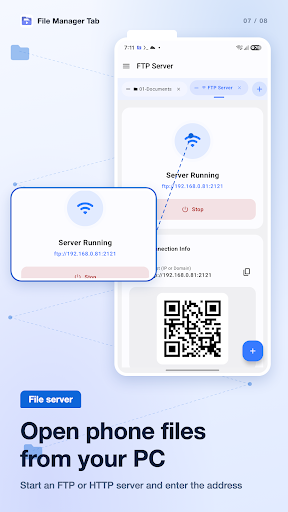
Open every folder you need in tabs. File Manager Tab is a file manager and file explorer built around tabs, with a built-in SMB, FTP, SFTP and WebDAV client for your NAS and PC. Keep Downloads, your SD card, a NAS share and Google Drive open at the same time, swipe between them in portrait mode, and save each set of tabs as a workspace. Tabs and workspaces • Open folders in tabs, then pin, rename, color and reorder them • Swipe between tabs with one hand in portrait mode • Save groups of tabs as workspaces and switch in one tap • Dual-pane view in landscape, on tablets and on foldables • Copy, move, rename, batch rename, delete, share and undo • Transfers keep running in the background with a progress notification NAS, PC and server access • SMB (SMB1/2/3), FTP, FTPS, SFTP and WebDAV clients • Find shared folders on your Wi-Fi with the network scanner • Stream videos straight from your NAS and resume interrupted transfers • Open NAS folders from other apps through the system file picker • Cloud storage: Google Drive, Dropbox, OneDrive, Box, Nextcloud, Yandex Disk and MEGA Wi-Fi file transfer to PC • Built-in FTP server and HTTP server: open your phone's files from a PC browser or FTP client • Upload files from the browser, with optional login • Start or stop the servers from a quick settings tile ZIP and RAR extractor • Unzip ZIP files and extract RAR (including split archives), 7z, TAR, TAR.GZ, TAR.BZ2 and TAR.XZ • Create ZIP and 7z archives with a password • Extract archives directly from your NAS or cloud Documents and media • Office viewer for Word, Excel and PowerPoint files (DOC, DOCX, XLS, XLSX, PPT, PPTX), including password-protected ones • HWP and HWPX (Hangul) document viewer • PDF reader with text search, EPUB reader, and a text and code editor • Video player with subtitles, playback speed, A-B repeat, picture-in-picture and Chromecast • Music player with background playback and playlists • Converters: images to PDF, PDF to images, video to GIF, extract audio and more Storage cleaner • Storage analysis by folder and file type • Find large files, duplicate files and junk files • Recycle bin to restore deleted files, emptied automatically after the time you choose Privacy • App lock with PIN, password, pattern or biometrics • Hide private files in the Hidden Zone, encrypted with an Android Keystore key • Export an encrypted Hidden Zone backup to move it to a new phone Make it yours • Color themes, dark mode and matching app icons • Widgets for storage, favorites, quick access and recent files • Favorites, app shortcuts and 45 languages Permissions All files access (MANAGE_EXTERNAL_STORAGE) is used to browse and manage files on your device storage. NAS and cloud features need a network connection and your own server or account sign-in. Some locations and actions depend on your Android version and device.




More like this
- Top Tools on Google Play by estimated revenue
- File Manager Tab: NAS & SMB alternatives
- File Manager Tab: NAS & SMB vs FF Sensi Max
- File Manager Tab: NAS & SMB vs Tesor
- All top charts and categories


