
PDF Tools: Editor & Converter
Mukesh DatyalToolsGoogle PlayContains adsPDF Tools: Editor & Converter revenue and downloads, last 30 days
How we got this (12 inputs)
- signals
- Play installs ÷ age; lifetime→current drift ×/÷4.12 (135278 measured Play counter deltas)
- spread
- measured on downloads ground truth (downloads ground truth: 48 App Store milestones, 33 platform splits, 13 drift points)
- installs
- 26
- age days
- 176
- bound
- at most the lifetime installs counter (26) over 30 days: the listing is 176 days old, so its last 30 days cannot hold more installs than it ever had
- range scale
- ×0.88 (coverage scale on 9 ground-truth rows; publication is decided before it)
- likelyLow
- 3
- likelyHigh
- 13
- confidence
- medium
- observed days (of 30)
- 2
- measured days
- 0
- scaling
- observed days, scaled to 30
As of Nov 21, 2026.
How we got this (12 inputs)
- method
- installs in the window (all active on install day) + earlier installers active in the month (published retention ÷ the category's DAU/MAU stickiness) + the retained base of installers older than two years
- downloads per day
- 0.23 (0.07 to 0.6, the published worldwide figure)
- retention
- day 1 / 7 / 30: 23.7% / 6.54% / 2.45% (Android benchmark × 1.17 for the category; AppsFlyer Q3 2024 day-1/7/30 retention, via getstream.io/blog/app-retention-guide (read 2026-11-16); category: OneSignal 2024 day-30 retention by category, via getstream.io/blog/app-retention-guide (read 2026-11-16))
- active days per install
- 3.88 over 176 days
- stickiness
- 17.5% DAU/MAU, Productivity & Tools median (MWM DAU/MAU medians, US iOS, May 2026 (mwm.ai/glossary/dau-mau, read 2026-11-16))
- parts
- window installs 7 (the published 30-day downloads), earlier installers 2, retained base 0
- spread
- downloads ×/÷3, retention ×/÷3, tail ×/÷1.37, stickiness ×/÷1.8 (assumptions; not fitted)
- chart persistence (recorded, not used)
- 0 day(s) on a chart in the window; fewer than 7 live days exist
- bound
- at most the listing's 27 lifetime installs
- tier
- modelled: retention and stickiness are published benchmarks, not measured on this listing
- confidence
- low
- rough
- order of magnitude
As of Nov 21, 2026.
Daily active users
Modelled from this app's downloads and a published retention curve for its store and category, not measured. Read it as an order of magnitude.
History
Daily readings as we observed them, last 30 days worldwide. Free shows the last 30 days.
Downloads per day
Observed by us since Nov 19, 2026.
Installs, Play counter
Observed by us since Nov 19, 2026.
Monthly history: we have found no public-archive copy of this store page from the last 12 months, so monthly readings start with our own in Nov 2026.
Create a free account to save apps; Pro shows full history.
Chart positions
Where this app ranks on the top free, paid and grossing charts we capture.
Search terms
No search terms read for this app yet. Terms are read from its title and the searches it shows up in, and appear here once ranked.
In-app purchases
Prices
In-app purchase ladder, price changes and paywall terms
No in-app prices recorded yet. We read them from the store listing: either this app sells none, or its listing has not been read yet.
Ratings and reviews
Rating distribution
No rating distribution read yet.
Recent reviews
Marketing
Paid ads, organic videos and onboarding captured for this app.
Paid ads
No Meta, Google or TikTok ads tied to this app yet. We check the public ad libraries daily.
Onboarding
No store screenshots, web funnel or in-app recording captured for this app yet.
Change history
Versions, price changes, rank jumps and listing edits, as we observed them.
Details
- Developer
- Mukesh Datyal, 15 apps
- Package
- datyaltech.android.pdftoolsoffline
- Category
- Tools
- Price
- Free
- Released
- May 29, 2026
- Updated
- Oct 31, 2026
- Version
- 1.0.4
- Size
- -
- Content rating
- Everyone
- Contact email
- datyaltech@gmail.com
- Privacy policy
- mukeshdatyal.github.io/
- Languages
- Not available
- Charted in
- United States
- First seen
- Nov 19, 2026
- Listing read
- Nov 22, 2026
Show store descriptionShow less
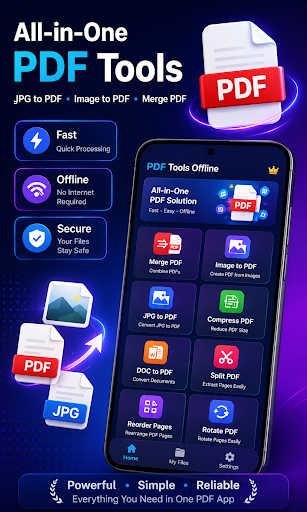
📄 PDF Tools – PDF Editor, Converter & Scanner PDF Tools is an all-in-one PDF utility for Android that helps you create, manage and work with PDF documents from your phone or tablet. Create a PDF from images, scan paper documents, convert files, merge PDF documents and compress large files with simple tools designed for everyday use. Whether you're working, studying, running a small business or managing documents at home, PDF Tools puts essential PDF utilities in one convenient app. 📑 PDF Editor & PDF Tools Handle common PDF tasks without needing multiple apps. Use PDF Tools to work with your documents, organise files and perform everyday PDF operations from your Android device. Perfect for students, professionals, teachers, businesses and anyone who regularly works with digital documents. 🖼️ Image to PDF & JPG to PDF Turn images and photos into PDF documents. The Image to PDF and JPG to PDF tools are useful for converting photos, scanned paperwork, receipts, invoices, forms, notes and other images into shareable PDF files. Create PDFs from images stored on your phone whenever you need a digital document. 📷 PDF Scanner & Document Scanner Turn your Android phone into a convenient PDF Scanner and Document Scanner. Scan and save everyday paperwork such as: • Receipts • Invoices • Forms • Notes • Assignments • Business documents • Personal paperwork • Printed documents Keep important paperwork available digitally instead of carrying physical copies. 🔄 PDF Converter Use the PDF Converter for everyday document conversion needs. Convert supported files into PDF format and create documents that are easier to store, share and submit. Useful for work documents, school assignments, applications, invoices and personal records. 📄 PDF Maker Create PDF documents from your images and supported files with the built-in PDF Maker. Make documents for: • School and college • Office work • Business paperwork • Receipts and invoices • Forms and applications • Personal records • Document sharing 🔗 Merge PDF Need to combine several documents? Merge PDF lets you combine multiple PDF files into a single document, making it easier to organise related pages and share them as one file. Useful for business reports, assignments, applications, invoices and collections of scanned documents. 📦 Compress PDF Large PDF files can be inconvenient to store or share. Use Compress PDF to reduce the size of supported PDF documents when you need a more manageable file for sharing, storage or uploading. 🇺🇸 PDF Tools for the USA Designed for everyday PDF workflows used across the United States. Use PDF Tools for: • Work and office documents • College and school assignments • Business paperwork • Receipts and invoices • Forms and applications • Scanned documents • Personal records • Digital document sharing Whether you're preparing a document for work, scanning a receipt or creating a PDF from photos, PDF Tools provides useful PDF utilities in one Android app. 🇬🇧 PDF Tools for the UK PDF Tools is also suitable for everyday document management in the United Kingdom. Create and manage PDFs for: • Work and office documents • School and university work • Business paperwork • Receipts and invoices • Forms and applications • Scanned paperwork • Personal documents • Digital file sharing Use the same convenient PDF tools whether you're at home, in the office, studying or managing documents on the go. ⭐ KEY FEATURES ✓ PDF Tools ✓ PDF Editor ✓ PDF Converter ✓ PDF Scanner ✓ Image to PDF ✓ JPG to PDF ✓ PDF Maker ✓ Document Scanner ✓ Merge PDF ✓ Compress PDF ✓ Create PDFs from images ✓ Scan documents into digital files ✓ Manage PDF documents on Android ✓ Useful for work, school, business and personal documents 📱 One PDF App for Everyday Tasks Instead of using separate apps for common PDF tasks, keep essential utilities together in PDF Tools. PDF Tools – simple PDF utilities for everyday documents in the USA, UK and beyond.


More like this
- Top Tools on Google Play by estimated revenue
- PDF Tools: Editor & Converter alternatives
- PDF Tools: Editor & Converter vs FF Sensi Max
- PDF Tools: Editor & Converter vs Tesor
- All top charts and categories


