
Your Calendar Widget
Manuel ShenavaiProductivityGoogle PlayIn-app purchasesContains adsYour Calendar Widget revenue and downloads, last 30 days
History
Daily readings as we observed them, last 30 days worldwide. Free shows the last 30 days.
One reading so far: history starts Nov 23, 2026, and a trend line appears after the next daily reading.
Monthly history: we have found no public-archive copy of this store page from the last 12 months, so monthly readings start with our own in Nov 2026.
Create a free account to save apps; Pro shows full history.
Chart positions
Where this app ranks on the top free, paid and grossing charts we capture.
Search terms
In-app purchases
Google Play shows one in-app price range per storefront, not each product's price. The range over time, as the store published it:
United Kingdom, GBP
- £0.89 - £104.99 if billed through PlayNov 23, 2026 to now
Prices
In-app purchase ladder, price changes and paywall terms
No itemised in-app prices yet. Google Play publishes only the price range shown above, not each product; the individual products and their prices have not been read.
Ratings and reviews
Rating distribution
Store histogram
8,203 ratings
Recent reviews
Marketing
Paid ads, organic videos and onboarding captured for this app.
Paid ads
No Meta, Google or TikTok ads tied to this app yet. We check the public ad libraries daily.
Organic videos
No YouTube, TikTok or Instagram videos tied to this app yet.
Onboarding
No store screenshots, web funnel or in-app recording captured for this app yet.
Change history
Versions, price changes, rank jumps and listing edits, as we observed them.
Details
- Developer
- Manuel Shenavai, 1 app
- Package
- de.mash.android.calendar
- Category
- Productivity
- Price
- Free
- Released
- Jul 14, 2017
- Updated
- Nov 11, 2026
- Version
- Not available
- Size
- -
- Content rating
- PEGI 3
- Website
- www.yourcalendarwidget.com
- Contact email
- manuel.shenavai@outlook.de
- Privacy policy
- yourcalendarwidget.com/privacypolicy.html
- Languages
- Not available
- Charted in
- United Kingdom, Brazil, Germany, Japan, South Korea, France
- First seen
- Nov 19, 2026
- Listing read
- Nov 23, 2026
Show store descriptionShow less
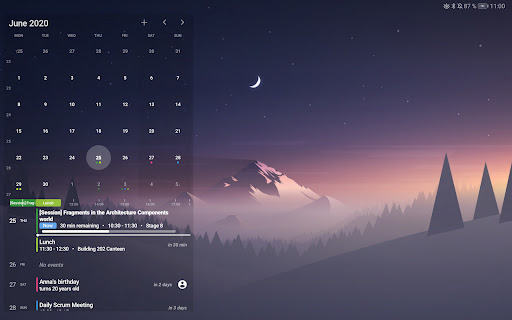
Your Calendar Widget is a widget, that can be used on the homescreen, lockscreen and your notification bar to show your upcoming Google Calendar events. You can easily configure and adapt the widget to your needs. Each widget has its own configuration. This allows you to have several widgets with different calendar- and display-settings. Features • The widget can be used on the homescreen, the lockscreen and in the notification bar • Almost every element can be adapted to your personal preferences • Agenda, inline-agenda and simple display mode. There is a variety of different event display options • Various options for event-visualization in order to identify upcoming events more easily (timeline, badges, notifications, font and background settings) • The month-calendar provides full access to the entire calendar right from the homescreen • View birthdays and anniversaries of your contacts • With the Task Integration tasks can be viewed and edited (Google Tasks, Microsoft To Dos) • Countless predefined themes provided by the system and the community • Events can be filtered using the event title • Any number of widgets can be created, each with its own configuration Permissions • Read Calendar: This permission is required to show your calendar events in the widget • Access your device Storage: This permission is required to read and write widget-backups. On Android P and higher this permission is also required to be able to show your wallpaper in the preview of the widget settings • Contacts: This permission is required if you like to see birthday and anniversary information from you contacts. Further its required to to read your account information to show your tasks. Task Integration With the Task Integration you are able to show your Google Tasks and Microsoft To Dos in the widget. Further you can create new tasks or complete existing tasks. The widget will also consider your subtasks. Google Reminders Google Reminders can't be displayed in the widget. Unfortunately Google does not provide an API to access Google Reminders. Microsoft Outlook In order to show your Outlook calendar in the widget, enable the Outlook calendar synchronization: 1) Open the Outlook App 2) Open the settings (click the top left Outlook-icon then select the settings-icon on the bottom) 3) In the General section, select Calendar and then enable Sync Calendars 4) In the Google Calendar app - Settings - Manage accounts - Enable the Outlook Calendar Widget is not updating or events are not appearing in the widget Following things can help if the widget is not showing the correct events: 1) Disable powersaving options and restart the device 2) Check that the calendar is synced (Google Calendar App) 3) Synchronize calendar data: open Google Calendar App - menuentry Refresh (repeat multiple times) Further help on synchronization problems can be found here: https://support.google.com/calendar/answer/6261951?hl=en 4) For issues with shared calendars: Delete the Storage of the Google Calendar app (App Info > Storage & Cache > Clear Storage) which forces a full app reset and sync of all calendar data. PRO Edition Not Detected If your purchase is not detected (i.e. after switching to a new phone), try this: https://support.google.com/googleplay/answer/1050566?hl=en Usually a restart of the device solves the problem. Change the color of source calendars Changing the source calendar color can be done with any calendar app How to create a widget Open Your Calendar Widget - Press bottom right button (+) - Choose 'Add Automatically'




More like this
- Top Productivity on Google Play by estimated revenue
- Your Calendar Widget alternatives
- Your Calendar Widget vs Klender, family calendar
- Your Calendar Widget vs Anchor Smart Saver
- All top charts and categories
Similar apps
Klender, family calendarKlender4.6 ★ (8.2K)
Anchor Smart SaverPanasonic Life Solutions India Pvt. Ltd.4.2 ★ (8.3K)
SpeakApp AI: Voice NotesElve Tech Ltd
gogh - Focus with Your Avatargogh Japan3.9 ★ (8.2K)
Photo Widget - Albumsambi mx4.0 ★ (8.2K)
QR Code ReaderConvenient & Easy Apps4.4 ★ (8.2K)
Looping - Family calendarDictionaryAndTranslator3.0 ★ (8.3K)
Recovery Photo - File RestoreAbCdE4.3 ★ (8.2K)