Android System Widgets
Benjamin LawsProductivityGoogle PlayAndroid System Widgets revenue and downloads, last 30 days
History
Daily readings as we observed them, last 30 days worldwide. Free shows the last 30 days.
One reading so far: history starts Nov 22, 2026, and a trend line appears after the next daily reading.
Monthly history: we have found no public-archive copy of this store page from the last 12 months, so monthly readings start with our own in Nov 2026.
Create a free account to save apps; Pro shows full history.
Chart positions
Where this app ranks on the top free, paid and grossing charts we capture.
Search terms
No search terms read for this app yet. Terms are read from its title and the searches it shows up in, and appear here once ranked.
In-app purchases
Prices
In-app purchase ladder, price changes and paywall terms
No in-app prices recorded yet. We read them from the store listing: either this app sells none, or its listing has not been read yet.
Ratings and reviews
Rating distribution
Store histogram
866 ratings
Recent reviews
Marketing
Paid ads, organic videos and onboarding captured for this app.
Paid ads
No Meta, Google or TikTok ads tied to this app yet. We check the public ad libraries daily.
Organic videos
No YouTube, TikTok or Instagram videos tied to this app yet.
Change history
Versions, price changes, rank jumps and listing edits, as we observed them.
Details
- Developer
- Benjamin Laws, 4 apps
- Package
- de.program_co.asciisystemwidgetsdemo
- Category
- Productivity
- Price
- Free
- Released
- Sep 18, 2018
- Updated
- Mar 9, 2026
- Version
- 25.12.2
- Size
- -
- Content rating
- Everyone
- Website
- android-co.de
- Contact email
- support@android-co.de
- Privacy policy
- android-co.de/legal/app-data-privacy-info.htm
- Languages
- Not available
- Charted in
- United States
- First seen
- Nov 22, 2026
- Listing read
- Nov 22, 2026
Show store descriptionShow less
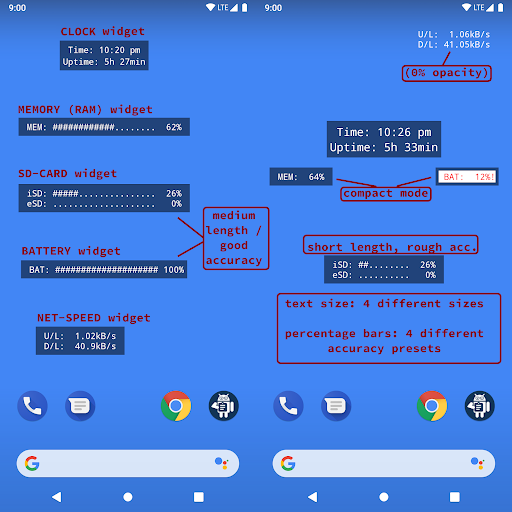
System Widgets Collection – Monitor & Customize Your Phone All essential info right on your home screen: Clock, Date, Uptime, RAM, Storage, Battery, Net Speed & Flashlight. Included Widgets: 🕒 Clock / Uptime 📈 Memory (RAM) Usage – monitor free & used RAM 💾 Storage / SD-Card Usage – available & used space 🔋 Battery – level + NEW: 🌡️ temperature (°C / °F) 🌐 Net Speed – current upload/download speed (NEW: switch Bytes/s ↔ Bits/s) ✨ Multi Widget – combine several of the above in one widget (configurable) 🔦 Flashlight Widget – auto-off after 2 minutes, with 4 icon sets to choose from (Permission for camera & flashlight is required only to control the LED. The app cannot take pictures!) Free Version Limitations (compared to "+" version): • Multi Widget: some elements disabled • No custom font & background colors • Battery, SD and RAM update interval fixed at 60s • Flashlight auto-off always after 2 minutes How To (Setup & Troubleshooting): 1. Open the app and adjust widget settings to your needs 2. Add the desired widgets to your home screen 👉 If widgets don’t load right after installation: restart your device or re-install the app. 👉 If widgets show "null" or don’t update: open the app once to initialize and make sure the Keep-Alive Service is enabled in General Settings. Tapping Actions: Tapping most widgets shows detailed info as a toast/notification. Example: Internal SD: 753.22MB / 7.89GB Global Settings: 🎨 Widget Font Color – + Feature! 🖼️ Widget Background Color – + Feature! ▓ Custom Characters – for percentage bar display Widget Configuration Options: - Background opacity - Font size - Percentage bar length & accuracy (or compact mode) - Alignment of widget content (precise positioning on screen) Why Choose System Widgets Free? ✔️ All-in-one widget collection (RAM, Storage, Battery, Network/Internet Speed, Clock, Flashlight) ✔️ Lightweight, fast & ad-free ✔️ Upgrade anytime to the full "+"-version for more customization 📲 Download System Widgets Free now – monitor your phone and customize your home screen!
More like this
- Top Productivity on Google Play by estimated revenue
- Android System Widgets alternatives
- Android System Widgets vs AutoSec: No Ads VPN & Security
- Android System Widgets vs Bria - VoIP SIP Softphone
- All top charts and categories
Similar apps
AutoSec: No Ads VPN & SecuritySXGuard4.2 ★ (882)
Bria - VoIP SIP SoftphoneCounterPath Corp4.1 ★ (878)
sp8cetimesp8cetime4.5 ★ (878)
Invoice Maker: Billing ManagerStarItZone5.0 ★ (883)
BLUE TAXINET Informatika1.7 ★ (883)
KFC ConnectYUM CONNECT4.2 ★ (877)
Status Downloader and SaverZaneX Technologies4.6 ★ (877)
APSFL Subscriber AppAPSFL