Unitasker: AI Goal Planner
Contorta DevelopmentProductivityGoogle PlayIn-app purchasesContains adsUnitasker: AI Goal Planner revenue and downloads, last 30 days
How we got this (13 inputs)
- signals
- Play installs ÷ age; lifetime→current drift ×/÷4.12 (135278 measured Play counter deltas)
- spread
- measured on downloads ground truth (downloads ground truth: 48 App Store milestones, 33 platform splits, 13 drift points)
- installs
- 100
- age days
- 67
- note
- install counter moved once in 2.41 day(s); one step can hold several days of installs, so it is not read as a daily rate yet
- bound
- at most the lifetime installs counter (100) over 30 days: the listing is 67 days old, so its last 30 days cannot hold more installs than it ever had
- range scale
- ×0.88 (coverage scale on 9 ground-truth rows; publication is decided before it)
- likelyLow
- 20
- likelyHigh
- 56
- confidence
- medium
- observed days (of 30)
- 3
- measured days
- 0
- scaling
- observed days, scaled to 30
As of Nov 21, 2026.
How we got this (11 inputs)
- method
- installs in the window (all active on install day) + earlier installers active in the month (published retention ÷ the category's DAU/MAU stickiness) + the retained base of installers older than two years
- downloads per day
- 1.17 (0.4 to 2.43, the published worldwide figure)
- retention
- day 1 / 7 / 30: 24.81% / 6.84% / 2.57% (Android benchmark × 1.22 for the category; AppsFlyer Q3 2024 day-1/7/30 retention, via getstream.io/blog/app-retention-guide (read 2026-11-16); category: OneSignal 2024 day-30 retention by category, via getstream.io/blog/app-retention-guide (read 2026-11-16))
- active days per install
- 2.91 over 67 days
- stickiness
- 17.5% DAU/MAU, Productivity & Tools median (MWM DAU/MAU medians, US iOS, May 2026 (mwm.ai/glossary/dau-mau, read 2026-11-16))
- parts
- window installs 35 (the published 30-day downloads), earlier installers 5, retained base 0
- spread
- downloads ×/÷2.47, retention ×/÷3, tail ×/÷1.18, stickiness ×/÷1.8 (assumptions; not fitted)
- chart persistence (recorded, not used)
- 0 day(s) on a chart in the window; fewer than 7 live days exist
- tier
- modelled: retention and stickiness are published benchmarks, not measured on this listing
- confidence
- low
- rough
- order of magnitude
As of Nov 21, 2026.
Daily active users
Modelled from this app's downloads and a published retention curve for its store and category, not measured. Read it as an order of magnitude.
History
Daily readings as we observed them, last 30 days worldwide. Free shows the last 30 days.
Downloads per day
Observed by us since Nov 18, 2026.
Installs, Play counter
Observed by us since Nov 18, 2026.
Monthly history: we have found no public-archive copy of this store page from the last 12 months, so monthly readings start with our own in Nov 2026.
Create a free account to save apps; Pro shows full history.
Chart positions
Where this app ranks on the top free, paid and grossing charts we capture.
Search terms
No search terms read for this app yet. Terms are read from its title and the searches it shows up in, and appear here once ranked.
In-app purchases
Google Play shows one in-app price range per storefront, not each product's price. The range over time, as the store published it:
United States, USD
- $9.00 - $79.00 per itemNov 21, 2026 to now
Prices
In-app purchase ladder, price changes and paywall terms
No itemised in-app prices yet. Google Play publishes only the price range shown above, not each product; the individual products and their prices have not been read.
Ratings and reviews
Rating distribution
No rating distribution read yet.
Recent reviews
Marketing
Paid ads, organic videos and onboarding captured for this app.
Paid ads
No Meta, Google or TikTok ads tied to this app yet. We check the public ad libraries daily.
Organic videos
No YouTube, TikTok or Instagram videos tied to this app yet.
Change history
Versions, price changes, rank jumps and listing edits, as we observed them.
- Nov 21, 2026New version 18.0 → 23.0
Details
- Developer
- Contorta Development, 5 apps
- Package
- dev.contorta.unitasker
- Category
- Productivity
- Price
- Free
- Released
- Sep 15, 2026
- Updated
- Nov 20, 2026
- Version
- 23.0
- Size
- -
- Content rating
- Everyone
- Website
- unitasker.contorta.dev
- Contact email
- contact@contorta.dev
- Privacy policy
- contorta.dev/unitasker/privacy
- Languages
- Not available
- Charted in
- United States
- First seen
- Nov 18, 2026
- Listing read
- Nov 21, 2026
Show store descriptionShow less
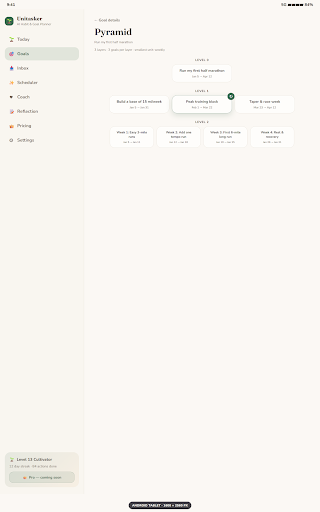
Make progress on what matters, one action at a time. Unitasker connects your long-term goals to the work you can do today. Capture ideas, break larger ambitions into manageable steps, and work through daily actions with a focused view that presents one task at a time. BUILD A PATH FROM GOAL TO ACTION Create goals with descriptions and dates, then organize smaller goals and daily actions beneath them. See how each step connects to the bigger picture with goal trees and a visual pyramid. Use the AI Goal Architect to suggest a breakdown, divide work into stages, and refine the plan with your own instructions. Review suggested steps before adding them to your goals. FOCUS ON THE NEXT TASK The Today screen brings due and overdue actions into a single-task view. Start the work timer, concentrate on the action in front of you, and finish the task to record your progress and time spent. When plans change, delay an action and return to it later. Follow-up prompts help you notice tasks that keep being postponed. CAPTURE FIRST, ORGANIZE LATER Save ideas and to-dos in your inbox without deciding where everything belongs immediately. When you are ready, turn an inbox item into a new goal or a dated daily action linked to an existing goal. GET HELP PLANNING YOUR DAY Ask the AI Daily Scheduler to help turn pending inbox items into a focused plan. Use the Habit Coach for progress check-ins and suggestions for maintaining consistency. AI-generated suggestions can be imperfect, so review them and adapt them to your circumstances. SEE YOUR PROGRESS Track completed actions, daily streaks, levels, and earned badges. Progress indicators and garden-inspired visuals help make steady effort visible. REFLECT AND RESET Use the weekly reflection page to review completed work and missed actions. Complete an outstanding item, roll it forward, or archive it when it no longer belongs in your plan. Save notes about what worked, what got in the way, and what matters next. FEATURES • Long-term goals, smaller milestones, and daily actions • Goal trees and configurable planning pyramids • AI-assisted goal breakdown and refinement • One-task-at-a-time focus with a work timer • Inbox capture and organization • AI daily scheduling and habit coaching • Task completion, delay, and rescheduling • Streaks, levels, badges, and progress tracking • Weekly reviews and reflection notes Unitasker is designed for personal projects, study plans, routines, and other goals that benefit from consistent, manageable action. An account is required. Connected services and AI features require internet access. The current version is supported by advertising.
More like this
- Top Productivity on Google Play by estimated revenue
- Unitasker: AI Goal Planner alternatives
- Unitasker: AI Goal Planner vs PDF Reader: View Documents
- Unitasker: AI Goal Planner vs Smart Transfer: Copy My Data
- All top charts and categories
Similar apps
PDF Reader: View DocumentsCrow Drama Studio
Smart Transfer: Copy My DataDigiGen Apps
Smart Switch App File TransferCoddeX Studio
AI Voice Changer: TTSMatechmobile Global
AI Translate: Voice & CameraSING HUI PTE. LTD.
PDF Reader: Converter & EditorStyle Of Me - VTN Global
Clean TurboFreeTree Studio
PDF Reader & Document ViewerOSIAS CAPITAL