
MiniTXT: Notepad for TXT Notes
Max.Simple.AppsToolsGoogle PlayMiniTXT: Notepad for TXT Notes revenue and downloads, last 30 days
How we got this (12 inputs)
- signals
- Play installs ÷ age; lifetime→current drift ×/÷4.12 (135278 measured Play counter deltas)
- spread
- measured on downloads ground truth (downloads ground truth: 48 App Store milestones, 33 platform splits, 13 drift points)
- installs
- 1750
- age days
- 114
- bound
- at most the lifetime installs counter (1750) over 30 days: the listing is 114 days old, so its last 30 days cannot hold more installs than it ever had
- range scale
- ×0.88 (coverage scale on 9 ground-truth rows; publication is decided before it)
- likelyLow
- 316
- likelyHigh
- 940
- confidence
- medium
- observed days (of 30)
- 1
- measured days
- 0
- scaling
- observed days, scaled to 30
As of Nov 21, 2026.
How we got this (12 inputs)
- method
- installs in the window (all active on install day) + earlier installers active in the month (published retention ÷ the category's DAU/MAU stickiness) + the retained base of installers older than two years
- downloads per day
- 18.87 (6.07 to 43.83, the published worldwide figure)
- retention
- day 1 / 7 / 30: 23.7% / 6.54% / 2.45% (Android benchmark × 1.17 for the category; AppsFlyer Q3 2024 day-1/7/30 retention, via getstream.io/blog/app-retention-guide (read 2026-11-16); category: OneSignal 2024 day-30 retention by category, via getstream.io/blog/app-retention-guide (read 2026-11-16))
- active days per install
- 3.35 over 114 days
- stickiness
- 17.5% DAU/MAU, Productivity & Tools median (MWM DAU/MAU medians, US iOS, May 2026 (mwm.ai/glossary/dau-mau, read 2026-11-16))
- parts
- window installs 566 (the published 30-day downloads), earlier installers 133, retained base 0
- spread
- downloads ×/÷2.69, retention ×/÷3, tail ×/÷1.29, stickiness ×/÷1.8 (assumptions; not fitted)
- chart persistence (recorded, not used)
- 0 day(s) on a chart in the window; fewer than 7 live days exist
- bound
- at most the listing's 1750 lifetime installs
- tier
- modelled: retention and stickiness are published benchmarks, not measured on this listing
- confidence
- low
- rough
- order of magnitude
As of Nov 21, 2026.
Daily active users
Modelled from this app's downloads and a published retention curve for its store and category, not measured. Read it as an order of magnitude.
History
Daily readings as we observed them, last 30 days worldwide. Free shows the last 30 days.
One reading so far: history starts Nov 21, 2026, and a trend line appears after the next daily reading.
Monthly history: we have found no public-archive copy of this store page from the last 12 months, so monthly readings start with our own in Nov 2026.
Create a free account to save apps; Pro shows full history.
Chart positions
Where this app ranks on the top free, paid and grossing charts we capture.
Search terms
In-app purchases
Prices
In-app purchase ladder, price changes and paywall terms
No in-app prices recorded yet. We read them from the store listing: either this app sells none, or its listing has not been read yet.
Ratings and reviews
Rating distribution
No rating distribution read yet.
Recent reviews
Marketing
Paid ads, organic videos and onboarding captured for this app.
Paid ads
No Meta, Google or TikTok ads tied to this app yet. We check the public ad libraries daily.
Organic videos
No YouTube, TikTok or Instagram videos tied to this app yet.
Onboarding
No store screenshots, web funnel or in-app recording captured for this app yet.
Change history
Versions, price changes, rank jumps and listing edits, as we observed them.
Details
- Developer
- Max.Simple.Apps, 6 apps
- Package
- info.javaway.micronotepad
- Category
- Tools
- Price
- Free
- Released
- Jul 30, 2026
- Updated
- Nov 16, 2026
- Version
- 1.9
- Size
- -
- Content rating
- Everyone
- Contact email
- max.simple.apps@gmail.com
- Privacy policy
- javaway.info/minitxt-privacy-policy
- Languages
- Not available
- Charted in
- United States, South Korea, Japan
- First seen
- Nov 21, 2026
- Listing read
- Nov 21, 2026
Show store descriptionShow less
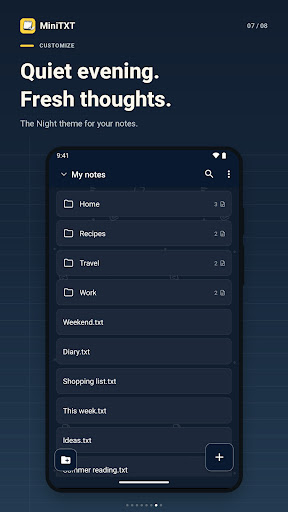
MiniTXT is a tiny offline notepad and lightweight TXT editor for simple notes and plain text files. The app takes up less than 300 KB, contains no ads, requests no permissions, and has no internet access. It is a fast, private notebook that simply opens, edits, and saves text. YOUR NOTES ARE REGULAR FILES MiniTXT does not store notes in a hidden database. You choose a folder, and every note is saved there as a regular .txt file. Your text files remain fully under your control. You can: • Open them with any file manager or text editor • Copy them to a computer • Back them up or synchronize them with any service • Edit them in other applications • Keep them after uninstalling MiniTXT Deleting the app does not delete your notes. A SIMPLE OFFLINE NOTEPAD MiniTXT is designed for quick note-taking without accounts, subscriptions, cloud services, advertising, or unnecessary features. Open the notebook, write a note, and close it. Changes are saved automatically. FEATURES • Create and edit TXT notes • Work with multiple note folders • Switch folders by tapping the folder name in the header • Add new folders or disconnect existing ones • Disconnecting a folder never deletes its files • Browse nested folders with content counters • Search by file name and note contents • See search results while files are still being scanned • Create, rename, move, and delete notes • Rename a note right from the editor title • Select several notes to delete or move them at once • Find and replace inside a note: one match or all of them • Undo and redo while editing • Drag the scroll thumb to move through long notes • Automatically save changes while editing • Adjust the font size up to 2× the system setting • Display from 1 to 5 preview lines for each note • Show or hide the modification date • Three themes: Light, Night and Graphite, with optional background doodles • Interface in 12 languages TEXT FILE SUPPORT MiniTXT can open: • .txt files • .md Markdown files • .xml files You can open supported files from a file manager, send text to MiniTXT using the Android Share menu, or export a note using "Save a copy...". NO PERMISSIONS MiniTXT declares no Android permissions. You select a folder using the standard Android system folder picker. The app receives access only to the folder you choose. MiniTXT does not request access to your: • Contacts • Location • Camera • Microphone • Photos • Personal information There is no advertising, analytics, tracking, or internet permission. The app cannot upload your notes or send your data anywhere. INTENTIONALLY MINIMAL MiniTXT does not include: • Accounts • Cloud synchronization • Reminders • Rich text formatting • Online services • Complex settings It is a small offline notepad, notebook, and plain text editor for users who want direct access to their TXT notes. For advanced notes with synchronization, reminders, formatting, folders, and attachments, see my main app: Raccoon Notes.



More like this
- Top Tools on Google Play by estimated revenue
- MiniTXT: Notepad for TXT Notes alternatives
- MiniTXT: Notepad for TXT Notes vs FF Sensi Max
- MiniTXT: Notepad for TXT Notes vs Tesor
- All top charts and categories


