Simple HTTP Server:Wi-Fi Share
ubi.jpCommunicationGoogle PlaySimple HTTP Server:Wi-Fi Share revenue and downloads, last 30 days
History
Daily readings as we observed them, last 30 days worldwide. Free shows the last 30 days.
Ratings (worldwide)
Observed by us since Nov 22, 2026.
Installs, Play counter
Observed by us since Nov 22, 2026.
Monthly history: we have found no public-archive copy of this store page from the last 12 months, so monthly readings start with our own in Nov 2026.
Create a free account to save apps; Pro shows full history.
Chart positions
Where this app ranks on the top free, paid and grossing charts we capture.
Search terms
No search terms read for this app yet. Terms are read from its title and the searches it shows up in, and appear here once ranked.
In-app purchases
Prices
In-app purchase ladder, price changes and paywall terms
No in-app prices recorded yet. We read them from the store listing: either this app sells none, or its listing has not been read yet.
Ratings and reviews
Rating distribution
Store histogram
1,675 ratings
Recent reviews
Marketing
Paid ads, organic videos and onboarding captured for this app.
Paid ads
No Meta, Google or TikTok ads tied to this app yet. We check the public ad libraries daily.
Organic videos
No YouTube, TikTok or Instagram videos tied to this app yet.
Change history
Versions, price changes, rank jumps and listing edits, as we observed them.
Details
- Developer
- ubi.jp, 1 app
- Package
- jp.ubi.common.http.server
- Category
- Communication
- Price
- Free
- Released
- May 24, 2013
- Updated
- Sep 28, 2026
- Version
- 3.6.1
- Size
- -
- Content rating
- Everyone
- Website
- apps.ubi.jp
- Contact email
- app@ubi.jp
- Privacy policy
- apps.ubi.jp/apps/simple-http-server/privacy/
- Languages
- Not available
- Charted in
- United States
- First seen
- Nov 22, 2026
- Listing read
- Nov 23, 2026
Show store descriptionShow less
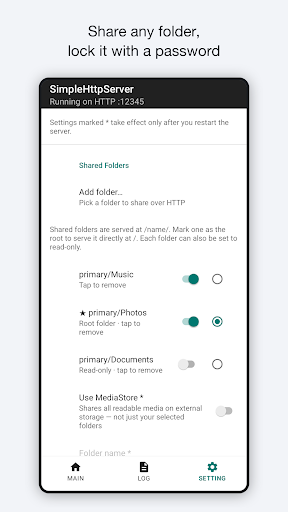
SimpleHttpServer turns your Android device into a small HTTP file server on your local network. Share folders from your phone or tablet so any device on the same Wi-Fi — laptop, desktop, smart TV, another phone — can browse, download, and upload files using just a web browser. No cloud account, no internet connection, and no installation on the other devices. KEY FEATURES ■ Multiple shared folders Add any number of folders through Android's system file picker. Each folder appears as a top-level entry in the browser. No special storage permissions required. ■ Download folders as ZIP Every folder page has a "Download this folder as ZIP" link so a client can grab an entire directory (including sub-folders) in one go. Turn the feature off in Settings if you prefer single-file downloads only. ■ Upload from a browser Turn on "Allow uploads" in Settings to drop files from a remote browser into your shared folders. Each shared folder has a read/write switch, so you can mix upload-friendly folders with download-only ones. Existing files are never overwritten — duplicates are saved as "name (1)", "name (2)", and so on. ■ Root folder Mark one shared folder as the root so its contents are served directly at "/" — handy when you only want a single folder visible at the top level. ■ Digest Authentication Protect access with a username and password. With curl, add --digest -u user:pass. ■ HTTPS (encryption), with HTTP alongside Turn on "Use HTTPS" to serve over TLS and encrypt the connection. The app generates a self-signed certificate on this device and shows its SHA-256 fingerprint so you can verify it. Download the certificate to trust it on client devices, or use curl's -k / --cacert option. When HTTPS is on, an optional "HTTP listener" setting can keep HTTP available on its regular port too — either as a plain endpoint, or as a redirect that forwards HTTP clients to the HTTPS URL (307). Only self-signed certificates are supported — you cannot install your own CA-issued (publicly trusted) certificate. ■ Network interface selection Choose where the server listens — Wi-Fi only (default, recommended), all networks, or localhost only — so it stays off the cellular interface or other unintended networks. ■ MediaStore browsing Optionally expose Android-managed media (images, audio, video) through a separate path, including content added by other apps. ■ mDNS / Bonjour discovery Optionally advertise the server on the local network so devices such as VLC and Finder can pick it up without typing the IP. ■ Tablet-friendly UI On large landscape screens, the server controls and the log are shown side by side. A Settings button swaps the right pane between the log and the settings. ■ Mobile-friendly directory listings Listings fit the screen width with larger text, full-width tappable rows, and follow the device's light/dark theme. ■ Auto-start Optionally start the server automatically when the device boots, or when the app is opened. ■ One-tap sharing Each server URL has Copy, QR-code, and Share buttons so other devices can connect without typing the address. ■ Built-in guide Settings → About has a "How to use" guide covering getting started, uploads, HTTPS, and curl examples. NO ADS · NO TRACKING · NO ACCOUNT REQUIRED The server runs entirely on your device and serves files on the local network over HTTP, or HTTPS when you enable it. No analytics SDKs, no account sign-up. Read the in-app privacy policy under Settings → About for details. LOCALIZED IN English, Japanese, German, French, Spanish, Brazilian Portuguese. REQUIREMENTS Android 8.0 (API 26) or later. SECURITY NOTE By default the server uses plain HTTP, so credentials and files are not encrypted in transit. Turn on HTTPS to encrypt the connection with a self-signed certificate. Use it on trusted local networks; only enable uploads on networks you trust, and consider turning on Digest Authentication and/or HTTPS. CONTACT app@ubi.jp
More like this
- Top Communication on Google Play by estimated revenue
- Simple HTTP Server:Wi-Fi Share alternatives
- Simple HTTP Server:Wi-Fi Share vs XChange Data
- Simple HTTP Server:Wi-Fi Share vs Hoplr - Know your neighbours
- All top charts and categories
Similar apps
XChange DataMarlink SAS4.1 ★ (1.7K)
Hoplr - Know your neighbourshoplr3.6 ★ (1.7K)
PixelfedDaniel Supernault2.4 ★ (1.7K)
Slick: eSIM & Global CallsSlick Networks, Inc.3.6 ★ (1.7K)
BlueBubblesBlueBubbles4.3 ★ (1.7K)
Bigboo - Live Video CallKeep Shine3.9 ★ (1.7K)
Orel PlusDencroft Business Solutions Pty Ltd4.5 ★ (1.7K)
Who visited my profile?Glacèu Apps3.9 ★ (1.7K)