Retro Clock Widget
lingen.mePersonalizationGoogle PlayRetro Clock Widget revenue and downloads, last 30 days
History
Daily readings as we observed them, last 30 days worldwide. Free shows the last 30 days.
Ratings (worldwide)
Observed by us since Nov 19, 2026.
Installs, Play counter
Observed by us since Nov 19, 2026.
Monthly history: we have found no public-archive copy of this store page from the last 12 months, so monthly readings start with our own in Nov 2026.
Create a free account to save apps; Pro shows full history.
Chart positions
Where this app ranks on the top free, paid and grossing charts we capture.
Search terms
No search terms read for this app yet. Terms are read from its title and the searches it shows up in, and appear here once ranked.
In-app purchases
Prices
In-app purchase ladder, price changes and paywall terms
No in-app prices recorded yet. We read them from the store listing: either this app sells none, or its listing has not been read yet.
Ratings and reviews
Rating distribution
Store histogram
81,057 ratings
Recent reviews
Marketing
Paid ads, organic videos and onboarding captured for this app.
Paid ads
No Meta, Google or TikTok ads tied to this app yet. We check the public ad libraries daily.
Organic videos
No YouTube, TikTok or Instagram videos tied to this app yet.
Change history
Versions, price changes, rank jumps and listing edits, as we observed them.
Details
- Developer
- lingen.me, 2 apps
- Package
- nl.jsource.retroclock.android
- Category
- Personalization
- Price
- Free
- Released
- -
- Updated
- Jan 7, 2024
- Version
- Not available
- Size
- -
- Content rating
- Everyone
- Website
- lingen.me/apps/retroclock
- Contact email
- retroclock@lingen.me
- Privacy policy
- lingen.me/privacy/retro-clock-widget/
- Languages
- Not available
- Charted in
- United States
- First seen
- Nov 19, 2026
- Listing read
- Nov 22, 2026
Show store descriptionShow less
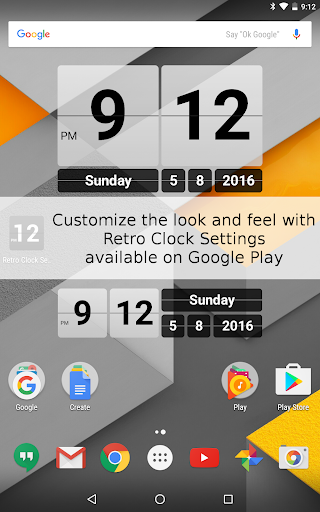
Now customize style and shortcuts with the Retro Clock Settings app, for sale on Google Play! Retro Clock Widget was one of the first clock widgets available for android and has been downloaded by millions of users over the years. This app provides a home screen clock and date widget based on the classical mechanical flipping clock. The widgets act as shortcuts to the systems alarm clock and calendar applications. When you want to customize the look and feel (like the colors, transparency, or shortcut applications), you can do so using the Retro Clock Settings companion app also available on Google Play. To use the widget: - long press an empty spot on the home screen - select "Widgets" - tap on Retro Clock / Date to add it to the home screen
More like this
- Top Personalization on Google Play by estimated revenue
- Retro Clock Widget alternatives
- Retro Clock Widget vs Day & Night Live Wallpapers
- Retro Clock Widget vs Photo blend
- All top charts and categories
Similar apps
Day & Night Live WallpapersG.3.K4.5 ★ (81.7K)
Photo blendSmart Photo Editor4.5 ★ (80.3K)
Newlook Launcher - Galaxy StarNext edu4.6 ★ (82K)
ExtraShorts LauncherOffline Glee Games4.7 ★ (82.1K)
Moonshine - Icon PackNate Wren Design4.2 ★ (80K)
Battery Charging Animation 4DTarrySoft4.2 ★ (79.8K)
Emoji Battery Icon CustomizeNew Widget Co.4.5 ★ (82.6K)
My Photo Phone DialerJudi Studio3.8 ★ (82.9K)