
MorbidMeter Widget
EP StudiosEntertainmentGoogle PlayMorbidMeter Widget revenue and downloads, last 30 days
History
Daily readings as we observed them, last 30 days worldwide. Free shows the last 30 days.
One reading so far: history starts Nov 22, 2026, and a trend line appears after the next daily reading.
Monthly history: we have found no public-archive copy of this store page from the last 12 months, so monthly readings start with our own in Nov 2026.
Create a free account to save apps; Pro shows full history.
Chart positions
Where this app ranks on the top free, paid and grossing charts we capture.
Search terms
No search terms read for this app yet. Terms are read from its title and the searches it shows up in, and appear here once ranked.
In-app purchases
Prices
In-app purchase ladder, price changes and paywall terms
No in-app prices recorded yet. We read them from the store listing: either this app sells none, or its listing has not been read yet.
Ratings and reviews
Rating distribution
No rating distribution read yet.
Recent reviews
Marketing
Paid ads, organic videos and onboarding captured for this app.
Paid ads
No Meta, Google or TikTok ads tied to this app yet. We check the public ad libraries daily.
Organic videos
No YouTube, TikTok or Instagram videos tied to this app yet.
Onboarding
No store screenshots, web funnel or in-app recording captured for this app yet.
Change history
Versions, price changes, rank jumps and listing edits, as we observed them.
Details
- Developer
- EP Studios, 2 apps
- Package
- org.epstudios.morbidmeter
- Category
- Entertainment
- Price
- Free
- Released
- Dec 31, 2011
- Updated
- Aug 10, 2026
- Version
- 3.2.0
- Size
- -
- Content rating
- Everyone
- Website
- epstudiossoftware.com
- Contact email
- mannd@epstudiossoftware.com
- Privacy policy
- www.epstudiossoftware.com/ep-mobile-privacy-policy/
- Languages
- Not available
- Charted in
- United States
- First seen
- Nov 22, 2026
- Listing read
- Nov 22, 2026
Show store descriptionShow less
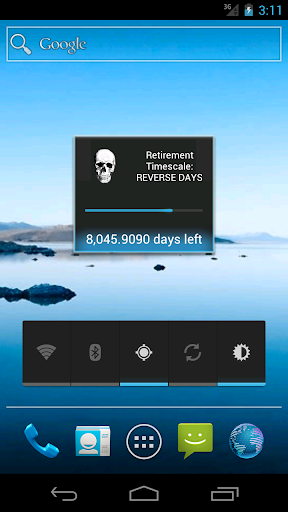
MorbidMeter is a widget that after installation can be placed on your home screen. It was originally designed to put your lifespan into perspective using various timescales that are easier (or sometimes harder) to grasp than an actual lifetime. The program takes your date of birth, your estimated life-span, today's date, and a unit of time (a year, hour, minute, month, and others) and generates where (when?) you are right now in that time unit. For example, if you select ONE YEAR as your timescale, the month, day and time will indicate how far along you are in that year, assuming your life ends at midnight on December 31st. Use a life expectancy calculator such as this one (http://www.livingto100.com) to figure out how long you should live (or just make up the number). Per Wikipedia (as of 12/31/2011) the average US lifespan is 78.3 years overall: 75.6 years for men and 80.8 years for women (36th in rank of all countries, tied with Cuba). However many people use MorbidMeter as a countdown widget, though this is a countdown widget that can countdown time using many different timescales, including real-time timescales (such as how many days, hours, and minutes remain). Time is running out -- MorbidMeter lets you know how quickly! Hints: To install MorbidMeter, press the Apps button, switch to the Widgets tab, then long press on the MorbidMeter widget to place it on one of your home screens. Makes sure you have at least half a screen (on a phone) blank to allow room to install the widget. Press the skull button to configure MorbidMeter. You can change the label, the start and stop dates, the timescale, whether you are counting down or counting up, and the update frequency of the app. Try out different timescales. You can reverse time and in some timescales can add msecs, which can increase with disturbing rapidity. Select Show Notifications on the setup screen and get notifications when major MorbidMeter milestones are reached (e.g. an hour of MorbidMeter time passes using the Year timescale). You can have multiple MorbidMeter widgets showing different timescales simultaneously. Note that the Lite (free) version has fewer timescales, update frequencies and lacks notifications of MorbidMeter milestones. MorbidMeter is a good way to remind you that nothing lasts forever. Not even you. If you have any trouble with this update, press the skull button to reconfigure, or long press the widget and drag it to the trash, and then pull out another MorbidMeter widget onto your home screen. MorbidMeter is open source, and available under the GNU GPL v3 license (http://http://www.gnu.org/licenses/gpl.html). The source code is available at https://www.github.com/mannd/morbidmeter-android. The skull icon is in the public domain. Source and documentation are at http://www.clker.com/clipart-80943.html.




More like this
- Top Entertainment on Google Play by estimated revenue
- MorbidMeter Widget alternatives
- MorbidMeter Widget vs 蓮ノ空 Live Photo Collection
- MorbidMeter Widget vs 펀네이션 - Funnation
- All top charts and categories


