
Presenter & Remote Controller
Paweł IwaneczkoToolsGoogle PlayPresenter & Remote Controller revenue and downloads, last 30 days
History
Daily readings as we observed them, last 30 days worldwide. Free shows the last 30 days.
One reading so far: history starts Nov 23, 2026, and a trend line appears after the next daily reading.
Monthly history: we have found no public-archive copy of this store page from the last 12 months, so monthly readings start with our own in Nov 2026.
Create a free account to save apps; Pro shows full history.
Chart positions
Where this app ranks on the top free, paid and grossing charts we capture.
Search terms
No search terms read for this app yet. Terms are read from its title and the searches it shows up in, and appear here once ranked.
In-app purchases
Prices
In-app purchase ladder, price changes and paywall terms
No in-app prices recorded yet. We read them from the store listing: either this app sells none, or its listing has not been read yet.
Ratings and reviews
Rating distribution
Store histogram
225 ratings
Recent reviews
Marketing
Paid ads, organic videos and onboarding captured for this app.
Paid ads
No Meta, Google or TikTok ads tied to this app yet. We check the public ad libraries daily.
Organic videos
No YouTube, TikTok or Instagram videos tied to this app yet.
Onboarding
No store screenshots, web funnel or in-app recording captured for this app yet.
Change history
Versions, price changes, rank jumps and listing edits, as we observed them.
Details
- Developer
- Paweł Iwaneczko, 2 apps
- Package
- pl.silsense.laserremote
- Category
- Tools
- Price
- Free
- Released
- Jul 19, 2016
- Updated
- Oct 1, 2026
- Version
- 3.9
- Size
- -
- Content rating
- Everyone
- Website
- Not available
- Contact email
- p.iwaneczko@gmail.com
- Privacy policy
- www.int-sd.net/privacy
- Languages
- Not available
- Charted in
- United States
- First seen
- Nov 23, 2026
- Listing read
- Nov 23, 2026
Show store descriptionShow less
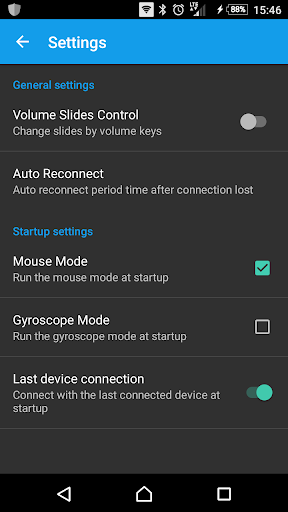
This application works only with installed PC software, which you can download from GitHub https://github.com/piwaneczko/PPLaserRemoteServer/releases/download/update/ppremotesetup.exe. The main purpose of this application is to control the Microsoft Power Point Presentation or OpenOffice Impress. The second purpose is to use your mobile device as remote control of your PC. Application is very intuitive and simple in use. It allows to control the PC by touchscreen, volume buttons and gyroscope sensors. Functions: 1. Presentation mode: - Change slides by next and previous buttons in application - Change slides by device volume buttons (depends of settings) - Run presentation (F5) - Stop presentation (Esc) - Run presentation in actual slide (Shift + F5) - Navigate laser pointer by touchpad control - Navigate laser pointer by gyroscope sensors (if device supports it) - Zooming PC screen by device volume buttons (depends of settings) - Sets silent mode (vibrate mode) while application is working 2. Remote control mode: - Move PC mouse cursor by touchpad control - Move PC mouse cursor by gyroscope sensor - Use mouse left and right buttons - Zooming in and zooming out PC screen - Change PC volume by volume buttons in smart phone - Simulate PC keyboard from device keyboard 3. Other: - Connection to the last connected device when application starts (depends of settings) - Autostart of mouse mode (depends of settings) - Autostart of gyroscope mode (depends of settings) - Auto re-connecting after connection lost (depends of settings) Communication: To use the bluetooth connection, you have to pair your Android Device with the PC firstly. If you will pair it properly, you have to choose your PC computer name from paired devices list. If you want to use WiFi connection, your device and PC have to be connected to the same wireless network. When it is done, you have to write an correct IP address and port number in WiFi connection settings, and then click OK or Connect button. IP address and port number is shown in PC software window. PC software after minimization is hidden to system tray. Requirements: - Operating system: Windows XP or newer - Bluetooth or WiFi - Installed server software on PC computer (download from GitHub)




More like this
- Top Tools on Google Play by estimated revenue
- Presenter & Remote Controller alternatives
- Presenter & Remote Controller vs PDF Reader: Sign & Merge PDF
- Presenter & Remote Controller vs AI App Builder - FlutterPilot
- All top charts and categories
Similar apps
PDF Reader: Sign & Merge PDFAlexadraJocely4.3 ★ (225)
AI App Builder - FlutterPilotAMSoftwares4.2 ★ (225)
Roku Movie RemoteTMH Technology Marketing Ltd4.0 ★ (225)
Just Counter ProNinad Khire4.2 ★ (225)
Progress TrackerArcangelo Muschitiello4.2 ★ (225)
Marathi Compass AppUrva Apps
WirePusher - Web API to PushIv4n4.7 ★ (225)
HismithHismith3.2 ★ (225)