Shake Screen On Off
MagicBooks EditoraProductivityGoogle PlayContains adsShake Screen On Off revenue and downloads, last 30 days
History
Daily readings as we observed them, last 30 days worldwide. Free shows the last 30 days.
One reading so far: history starts Nov 22, 2026, and a trend line appears after the next daily reading.
Monthly history: we have found no public-archive copy of this store page from the last 12 months, so monthly readings start with our own in Nov 2026.
Create a free account to save apps; Pro shows full history.
Chart positions
Where this app ranks on the top free, paid and grossing charts we capture.
Search terms
No search terms read for this app yet. Terms are read from its title and the searches it shows up in, and appear here once ranked.
In-app purchases
Prices
In-app purchase ladder, price changes and paywall terms
No in-app prices recorded yet. We read them from the store listing: either this app sells none, or its listing has not been read yet.
Ratings and reviews
Rating distribution
Store histogram
23,494 ratings
Recent reviews
Marketing
Paid ads, organic videos and onboarding captured for this app.
Paid ads
No Meta, Google or TikTok ads tied to this app yet. We check the public ad libraries daily.
Change history
Versions, price changes, rank jumps and listing edits, as we observed them.
Details
- Developer
- MagicBooks Editora, 17 apps
- Package
- shake.screen.on.off
- Category
- Productivity
- Price
- Free
- Released
- Sep 15, 2013
- Updated
- Aug 30, 2025
- Version
- 6.0
- Size
- -
- Content rating
- Mature 17+
- Contact email
- vade.mecum.juridico.completo@gmail.com
- Privacy policy
- freebooks-2qve.netlify.app/
- Languages
- Not available
- Charted in
- United States
- First seen
- Nov 22, 2026
- Listing read
- Nov 22, 2026
Show store descriptionShow less
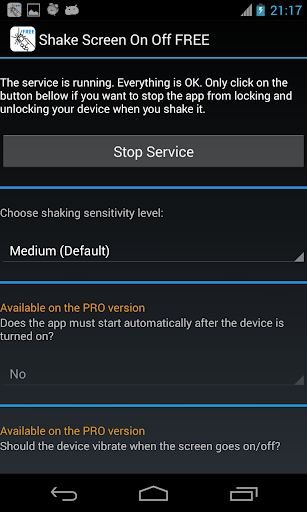
Turn your screen on and off by simply shaking your phone. Avoid breaking your power button. Just shake your phone and lock or unlock it. IT WILL NOT DRAIN YOUR BATTERY. On device's up to Android KitKat 4.4, the battery consumption should be minimal. On device's running Android 5+, due to an Android bug, there will be more battery being used, but it still should not be a huge amount. I did all I could to make the app work on Android 5+, and so I rather make it work, even if more battery is necessary to keep it working. My main focus when I implemented the app was on not draining the battery, and it won't. Let it run for a day and then check the app's battery consumption. It should be minimal (as opposed to other "Shake to turn the screen on and off" and "Shake to Lock and Unlock" apps on Google Play. This is the FREE version of the app. On the PRO version, you can do everything you can do on the FREE version, plus: 1 - no ads are displayed. 2 - the user can choose to start the app automatically after the device is turned on. 3 - the app can be set to unlock the screen automatically when the screen is turned back on. 4 - the app can use the proximity sensor to avoid accidentally turning on the screen when the device is on a pocket, for instance. 5 - The device can be set to vibrate every time the screen is turned on or off. ------------------------- UNINSTALLATION ------------------------- Due to the fact that the app needs admin privileges to run, if you want to uninstall it you must do it by clicking on the uninstall button inside the app. If you try to uninstall the app using the standard Android App Manager, the uninstall button will be disabled. Just remember that to uninstall the app, you must access the app itself. --------------------- COMPATIBILITY --------------------- Unfortunately, on some devices the app will not be able to turn the screen back on (when the user shakes the phone) after the screen is turned off. It's a hardware limitation of these devices, and there is nothing that can be done on the software side to avoid it. For instance, I've tested the app on the 'LG Nexus 4' and it works flawlessly; on the other hand, on the 'Samsung Galaxy Ace' the accelerometer sensors are turned off the moment the screen goes off. If that is the case on your device, please send me an email (there is a button on the app to do it) explaining what is happening on your specific case. The app will add the model and manufacturer of your device to the body of your email (please do not erase this information) and I will remove your device from the list of available devices on Google Play. Thank you very much for your help! --------------------- PERMISSIONS --------------------- Prevent phone from sleeping - necessary to wake the phone up after it's screen is turned off. View network connections and full network access - only necessary on the FREE version, to be able to show ads (non-intrusive ads, only displayed when the user open the main screen of the app). This app uses the Device Administrator permission in order to be able to lock and unlock the device when you shake it. Icon based on an original design by Timo Arnall, licensed under a Creative Commons Attribution License. Acessible (on september 2013) at: http://www.elasticspace.com/images/rfid_iconography_large.gif Thank you very much Timo.
More like this
- Top Productivity on Google Play by estimated revenue
- Shake Screen On Off alternatives
- Shake Screen On Off vs CZ
- Shake Screen On Off vs Hermit — Lite Apps Browser
- All top charts and categories
Similar apps
CZCZ Zorgverzekeringen4.2 ★ (23.3K)
Hermit — Lite Apps BrowserChimbori4.6 ★ (23.3K)
Diary with Lock: Daily JournalTidy Notes & Diary & Focus4.7 ★ (23.8K)
Chat AI - AI ChatBot & AgentAppZone AI4.3 ★ (23.8K)
Pickle: Your personal AI agentPickle, Inc.4.9 ★ (23.2K)
Samsung FlowSamsung Electronics Co., Ltd.3.8 ★ (23.2K)
네이버 메모 – Naver MemoNAVER Corp.2.9 ★ (23.8K)
Quillbot: AI Writing AssistantQuillBot4.4 ★ (23.1K)