
Scientific Calculator
TPH Software BDToolsGoogle PlayContains adsScientific Calculator revenue and downloads, last 30 days
How we got this (14 inputs)
- signals
- Play installs ÷ age; lifetime→current drift ×/÷4.12 (135278 measured Play counter deltas)
- spread
- measured on downloads ground truth (downloads ground truth: 48 App Store milestones, 33 platform splits, 13 drift points)
- installs
- 23
- age days
- 201
- note
- install counter did not move in 4.58 day(s); the counter moves in steps, so this is not read as zero
- bound
- at most the lifetime installs counter (23) over 30 days: the listing is 201 days old, so its last 30 days cannot hold more installs than it ever had
- range scale
- ×0.88 (coverage scale on 9 ground-truth rows; publication is decided before it)
- likelyLow
- 1
- likelyHigh
- 8
- confidence
- low
- rough
- order of magnitude
- observed days (of 30)
- 5
- measured days
- 0
- scaling
- observed days, scaled to 30
As of Nov 21, 2026.
How we got this (11 inputs)
- method
- installs in the window (all active on install day) + earlier installers active in the month (published retention ÷ the category's DAU/MAU stickiness) + the retained base of installers older than two years
- downloads per day
- 0.13 (0.03 to 0.43, the published worldwide figure)
- retention
- day 1 / 7 / 30: 23.7% / 6.54% / 2.45% (Android benchmark × 1.17 for the category; AppsFlyer Q3 2024 day-1/7/30 retention, via getstream.io/blog/app-retention-guide (read 2026-11-16); category: OneSignal 2024 day-30 retention by category, via getstream.io/blog/app-retention-guide (read 2026-11-16))
- active days per install
- 4.06 over 201 days
- stickiness
- 17.5% DAU/MAU, Productivity & Tools median (MWM DAU/MAU medians, US iOS, May 2026 (mwm.ai/glossary/dau-mau, read 2026-11-16))
- parts
- window installs 4 (the published 30-day downloads), earlier installers 1, retained base 0
- spread
- downloads ×/÷3.61, retention ×/÷3, tail ×/÷1.39, stickiness ×/÷1.8 (assumptions; not fitted)
- chart persistence (recorded, not used)
- 0 day(s) on a chart in the window; fewer than 7 live days exist
- tier
- modelled: retention and stickiness are published benchmarks, not measured on this listing
- confidence
- low
- rough
- order of magnitude
As of Nov 21, 2026.
Daily active users
Modelled from this app's downloads and a published retention curve for its store and category, not measured. Read it as an order of magnitude.
History
Daily readings as we observed them, last 30 days worldwide. Free shows the last 30 days.
Downloads per day
Observed by us since Nov 16, 2026.
Installs, Play counter
Observed by us since Nov 16, 2026.
Monthly history: we have found no public-archive copy of this store page from the last 12 months, so monthly readings start with our own in Nov 2026.
Create a free account to save apps; Pro shows full history.
Chart positions
Where this app ranks on the top free, paid and grossing charts we capture.
Search terms
No search terms read for this app yet. Terms are read from its title and the searches it shows up in, and appear here once ranked.
In-app purchases
Prices
In-app purchase ladder, price changes and paywall terms
No in-app prices recorded yet. We read them from the store listing: either this app sells none, or its listing has not been read yet.
Ratings and reviews
Rating distribution
No rating distribution read yet.
Recent reviews
Marketing
Paid ads, organic videos and onboarding captured for this app.
Paid ads
No Meta, Google or TikTok ads tied to this app yet. We check the public ad libraries daily.
Organic videos
No YouTube, TikTok or Instagram videos tied to this app yet.
Onboarding
No store screenshots, web funnel or in-app recording captured for this app yet.
Change history
Versions, price changes, rank jumps and listing edits, as we observed them.
Details
- Developer
- TPH Software BD, 53 apps
- Package
- tph.calculator
- Category
- Tools
- Price
- Free
- Released
- May 4, 2026
- Updated
- Oct 16, 2026
- Version
- 12
- Size
- -
- Content rating
- Everyone
- Website
- tphsoftwarebd.blogspot.com
- Contact email
- tphsoftwarebd@gmail.com
- Languages
- Not available
- Charted in
- United States
- First seen
- Nov 16, 2026
- Listing read
- Nov 21, 2026
Show store descriptionShow less
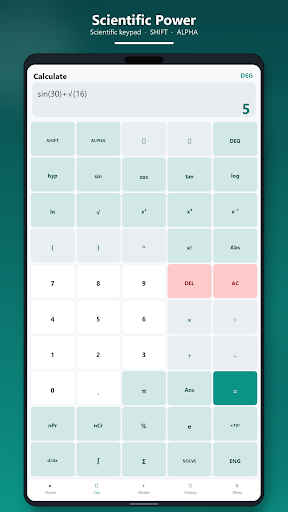
Scientific Calculator is an app designed for students, teachers, engineers, and anyone who needs accurate and reliable mathematical tools for study and work. Scientific Calculator lets you perform everyday arithmetic and advanced scientific work with an easy-to-use calculator interface. Choose your preferred angle unit, adjust decimal precision, and customize the result display to match your calculation needs. A short homework problem and a longer engineering calculation both stay easy to enter, review, and correct. The app provides simple navigation between Calculator, Modes, History, and Settings, so advanced mathematical tools are easy to reach. You can start with a basic calculation, open a specialized mode, check the result, and return to the main screen for the next problem. Features included in Scientific Calculator: • Scientific calculations with trigonometric, logarithmic, exponential, power, root, and fraction functions • Complex number calculations • Equation solving tools • Inequality solving tools • Ratio calculations • Scientific constants • Unit conversion tools • Number base conversions and calculations • Matrix operations • Vector calculations • Statistical analysis tools • Probability distribution tools • Function table generation These tools are part of Scientific Calculator, so classroom topics and technical calculations stay in one place. Degree, radian, and gradian angle units are available for trigonometric work, and you can choose how many decimal places appear in the answer. Scientific Calculator stores your calculation history on your device, so you can review previous calculations at any time. You can also clear your history whenever needed. Saved results help you check an earlier step while studying, without typing the whole expression again. Customize Scientific Calculator with light, dark, or system theme, preferred angle unit, vibration feedback, sound effects, display format, and calculation precision. A clear theme and a readable display make long study sessions and laboratory work more comfortable. Scientific Calculator is suitable for classroom learning, homework, engineering calculations, laboratory work, and everyday mathematical tasks. Copy and paste support makes it easy to reuse calculation results in other apps. Students can practice with it, and teachers and engineers can rely on it when they need a result on a phone. The interface is designed for clear input, readable results, organized navigation, and quick access to advanced mathematical tools. Common operations and scientific functions are grouped so they are easy to find during class, revision, or professional work. An internet connection is required to use the app. Download Scientific Calculator and keep powerful calculation tools ready whenever you study or work.


More like this
- Top Tools on Google Play by estimated revenue
- Scientific Calculator alternatives
- Scientific Calculator vs FF Sensi Max
- Scientific Calculator vs Tesor
- All top charts and categories


