Taskbar
Braden FarmerToolsGoogle PlayTaskbar revenue and downloads, last 30 days
How we got this (8 inputs)
- signals
- free, no IAP, on no grossing chart; ratings ÷ age
- method
- free, no IAP, on no grossing chart
- note
- the store lists no in-app purchases: likely monetises outside the store; range runs from $0 to what a comparable app with in-app purchases makes at its median
- likelyLow
- 0
- likelyHigh
- 4951.86
- confidence
- low
- rough
- order of magnitude
- observed days (of 30)
- 6
As of Nov 21, 2026.
How we got this (10 inputs)
- method
- Play install counter: total accepted delta ÷ elapsed days
- measured days
- 3.11
- window
- 2026-11-15..2026-11-19
- step spread
- ×/÷1.48 (the counter moves in steps; narrows with more days)
- likelyLow
- 56028
- likelyHigh
- 122139
- confidence
- medium
- observed days (of 30)
- 6
- measured days
- 2
- scaling
- projected to 30 days from 3.1 measured days (2026-11-15..2026-11-19, counter 7308592 → 7319817) plus 26.9 modelled days
As of Nov 21, 2026.
How we got this (13 inputs)
- method
- installs in the window (all active on install day) + earlier installers active in the month (published retention ÷ the category's DAU/MAU stickiness) + the retained base of installers older than two years
- downloads per day
- 2653.67 (1361.4 to 5984.63, the published worldwide figure)
- retention
- day 1 / 7 / 30: 23.7% / 6.54% / 2.45% (Android benchmark × 1.17 for the category; AppsFlyer Q3 2024 day-1/7/30 retention, via getstream.io/blog/app-retention-guide (read 2026-11-16); category: OneSignal 2024 day-30 retention by category, via getstream.io/blog/app-retention-guide (read 2026-11-16))
- active days per install
- 6.25 over 730 days (age 3777 days; the curve is used to 730)
- stickiness
- 17.5% DAU/MAU, Productivity & Tools median (MWM DAU/MAU medians, US iOS, May 2026 (mwm.ai/glossary/dau-mau, read 2026-11-16))
- parts
- window installs 79610 (the published 30-day downloads), earlier installers 62639, retained base 258043
- retained base
- 5382640 installers older than 730 days (lifetime from the listing's Play installs counter) × 4.79% active in a month (between 1.63%, the benchmark curve held flat, and 14.1%, median disclosed MAU ÷ lifetime installs of Duolingo, Snapchat and Grindr (company filings, data/ground-truth-active-users.csv; chosen on these rows, scored leave-one-product-out)); range ×/÷2 past each (widened after the leave-one-product-out check)
- spread
- downloads ×/÷2.1, retention ×/÷3, tail ×/÷1.58, stickiness ×/÷1.8, retained base ×/÷5.89 (assumptions; not fitted)
- ratings per download (recorded, not used)
- 0.00204
- chart persistence (recorded, not used)
- 0 day(s) on a chart in the window; fewer than 7 live days exist
- tier
- modelled: retention and stickiness are published benchmarks, not measured on this listing
- confidence
- low
- rough
- order of magnitude
As of Nov 21, 2026.
Daily active users
Modelled from this app's downloads and a published retention curve for its store and category, not measured. Read it as an order of magnitude.
History
Daily readings as we observed them, last 30 days worldwide. Free shows the last 30 days.
Downloads per day
Observed by us since Nov 15, 2026.
Revenue per day
Observed by us since Nov 15, 2026.
Ratings (worldwide)
Observed by us since Nov 15, 2026.
Installs, Play counter
Observed by us since Nov 15, 2026.
Monthly history: we have found no public-archive copy of this store page from the last 12 months, so monthly readings start with our own in Nov 2026.
Create a free account to save apps; Pro shows full history.
Chart positions
Where this app ranks on the top free, paid and grossing charts we capture.
Search terms
No search terms read for this app yet. Terms are read from its title and the searches it shows up in, and appear here once ranked.
In-app purchases
Prices
In-app purchase ladder, price changes and paywall terms
No in-app prices recorded yet. We read them from the store listing: either this app sells none, or its listing has not been read yet.
Ratings and reviews
Rating distribution
Store histogram
19,679 ratings
Recent reviews
Marketing
Paid ads, organic videos and onboarding captured for this app.
Paid ads
No Meta, Google or TikTok ads tied to this app yet. We check the public ad libraries daily.
Organic videos
No YouTube, TikTok or Instagram videos tied to this app yet.
Change history
Versions, price changes, rank jumps and listing edits, as we observed them.
Details
- Developer
- Braden Farmer, 5 apps
- Package
- com.farmerbb.taskbar
- Category
- Tools
- Price
- Free
- Released
- Jul 19, 2016
- Updated
- Oct 2, 2024
- Version
- 6.2.2
- Size
- -
- Content rating
- Everyone
- Website
- github.com/farmerbb/Taskbar
- Contact email
- farmerbb+taskbar@gmail.com
- Languages
- Not available
- Charted in
- United States, United Kingdom, Indonesia, Thailand, France
- First seen
- Nov 15, 2026
- Listing read
- Nov 19, 2026
Show store descriptionShow less
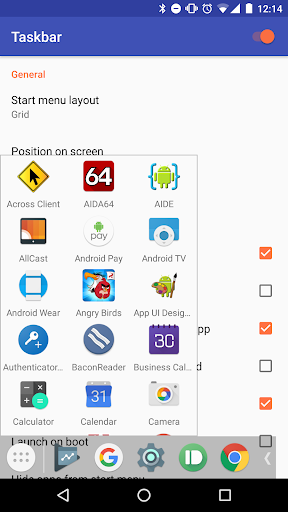
Taskbar puts a start menu and recent apps tray on top of your screen that's accessible at any time, increasing your productivity and turning your Android tablet (or phone) into a real multitasking machine! Taskbar supports Android 10's Desktop Mode, allowing you to connect your compatible device to an external display and run apps in resizable windows, for a PC-like experience! On devices running Android 7.0+, Taskbar can also launch apps in freeform windows without an external display. No root required! (see below for instructions) Taskbar is also supported on Android TV (sideloaded) and Chrome OS - use Taskbar as a secondary Android app launcher on your Chromebook, or turn your Nvidia Shield into an Android-powered PC! If you find Taskbar useful, please consider upgrading to the Donate Version! Simply tap the "Donate" option at the bottom of the app (or, on the web, click here). Features: • Start menu - shows you all applications installed on the device, configurable as a list or as a grid • Recent apps tray - shows your most recently used apps and lets you easily switch between them • Collapsible and hideable - show it when you need it, hide it when you don't • Many different configuration options - customize Taskbar however you want • Pin favorite apps or block the ones you don't want to see • Designed with keyboard and mouse in mind • 100% free, open source, and no ads Desktop mode (Android 10+, requires external display) Taskbar supports Android 10's built-in desktop mode functionality. You can connect your compatible Android 10+ device to an external display and run apps in resizable windows, with Taskbar's interface running on your external display and your existing launcher still running on your phone. Desktop mode requires a USB-to-HDMI adapter (or a lapdock), and a compatible device that supports video output. Additionally, certain settings require granting a special permission via adb. To get started, open up the Taskbar app and click "Desktop mode". Then, just tick the checkbox and the app will guide you through the setup process. For more information, click the (?) icon in the upper-right hand corner of the screen. Freeform window mode (Android 7.0+, no external display required) Taskbar lets you launch apps in freeform floating windows on Android 7.0+ devices. No root access is required, although Android 8.0, 8.1, and 9 devices require an adb shell command to be run during initial setup. Simply follow these steps to configure your device for launching apps in freeform mode: 1. Check the box for "Freeform window support" inside the Taskbar app 2. Follow the directions that appear in the pop-up to enable the proper settings on your device (one-time setup) 3. Go to your device's recent apps page and clear all recent apps 4. Start Taskbar, then select an app to launch it in a freeform window For more information and detailed instructions, click "Help & instructions for freeform mode" inside the Taskbar app. Accessibility service disclosure Taskbar includes an optional accessibility service, which can be enabled in order to perform system button press actions such as back, home, recents, and power, as well as displaying the notification tray. The accessibility service is used only to perform the above actions, and for no other purpose. Taskbar does not use accessibility services to perform any data collection whatsoever (in fact, Taskbar cannot access the Internet in any capacity as it does not declare the required Internet permission).
More like this
- Top Tools on Google Play by estimated revenue
- Taskbar alternatives
- Taskbar vs Bixberry
- Taskbar vs Split Screen - Dual Window
- All top charts and categories
Similar apps
BixberryBixberry4.3 ★ (19.7K)
Split Screen - Dual WindowGeniusTools Labs4.4 ★ (19.8K)
psp games downloaduschultz4.3 ★ (19.7K)
ParkMan - The Parking AppParkMan Oy4.7 ★ (19.8K)
Vsem VPN: Рабочая сетьVSEM NETWORK LLC4.8 ★ (19.7K)
All Video Downloaderadvanced downloader4.3 ★ (19.7K)
AT&T Personal CloudAT&T Services, Inc.3.6 ★ (19.8K)
MessengerCloudMind4.2 ★ (19.6K)