Split Screen - Dual Window
GeniusTools LabsToolsGoogle PlayIn-app purchasesContains adsSplit Screen - Dual Window revenue and downloads, last 30 days
How we got this (11 inputs)
- signals
- grossing chart; ratings ÷ age
- grossing id
- 2171 (TOOLS#171.5×12.7)
- ratings/day
- 7.92
- monetisation
- utilities ARPD 0.8; has IAP
- disagreement
- signals disagree (χ²/dof 2.15): range widened
- range
- 80% interval from out-of-fold residuals (×1.12 scale, 90 products)
- likelyLow
- 2711.52
- likelyHigh
- 19440.73
- confidence
- low
- rough
- order of magnitude
- observed days (of 30)
- 5
As of Nov 21, 2026.
How we got this (10 inputs)
- method
- Play install counter: total accepted delta ÷ elapsed days
- measured days
- 4.79
- window
- 2026-11-16..2026-11-21
- step spread
- ×/÷1.37 (the counter moves in steps; narrows with more days)
- likelyLow
- 188192
- likelyHigh
- 325364
- confidence
- high
- observed days (of 30)
- 5
- measured days
- 2
- scaling
- projected to 30 days from 4.8 measured days (2026-11-16..2026-11-21, counter 6888956 → 6944891) plus 25.2 modelled days
As of Nov 21, 2026.
How we got this (13 inputs)
- method
- installs in the window (all active on install day) + earlier installers active in the month (published retention ÷ the category's DAU/MAU stickiness) + the retained base of installers older than two years
- downloads per day
- 7997.27 (5041.57 to 14266.73, the published worldwide figure)
- retention
- day 1 / 7 / 30: 23.7% / 6.54% / 2.45% (Android benchmark × 1.17 for the category; AppsFlyer Q3 2024 day-1/7/30 retention, via getstream.io/blog/app-retention-guide (read 2026-11-16); category: OneSignal 2024 day-30 retention by category, via getstream.io/blog/app-retention-guide (read 2026-11-16))
- active days per install
- 6.25 over 730 days (age 2492 days; the curve is used to 730)
- stickiness
- 17.5% DAU/MAU, Productivity & Tools median (MWM DAU/MAU medians, US iOS, May 2026 (mwm.ai/glossary/dau-mau, read 2026-11-16))
- parts
- window installs 239918 (the published 30-day downloads), earlier installers 188772, retained base 53495
- retained base
- 1115869 installers older than 730 days (lifetime from the listing's Play installs counter) × 4.79% active in a month (between 1.63%, the benchmark curve held flat, and 14.1%, median disclosed MAU ÷ lifetime installs of Duolingo, Snapchat and Grindr (company filings, data/ground-truth-active-users.csv; chosen on these rows, scored leave-one-product-out)); range ×/÷2 past each (widened after the leave-one-product-out check)
- spread
- downloads ×/÷1.68, retention ×/÷3, tail ×/÷1.58, stickiness ×/÷1.8, retained base ×/÷5.89 (assumptions; not fitted)
- ratings per download (recorded, not used)
- 0.00099
- chart persistence (recorded, not used)
- 8 day(s) on a chart in the window; fewer than 7 live days exist
- tier
- modelled: retention and stickiness are published benchmarks, not measured on this listing
- confidence
- low
- rough
- order of magnitude
As of Nov 21, 2026.
Daily active users
Modelled from this app's downloads and a published retention curve for its store and category, not measured. Read it as an order of magnitude.
History
Daily readings as we observed them, last 30 days worldwide. Free shows the last 30 days.
Downloads per day
Observed by us since Nov 16, 2026.
Revenue per day
Observed by us since Nov 16, 2026.
Ratings (worldwide)
Observed by us since Nov 16, 2026.
Installs, Play counter
Observed by us since Nov 16, 2026.
Monthly history: we have found no public-archive copy of this store page from the last 12 months, so monthly readings start with our own in Nov 2026.
By country
30-day estimates per storefront, 1 storefront.
Create a free account to save apps; Pro shows full history.
Chart positions
On 1 chart at the latest capture. Charts are swept every 6 hours.
| Country | Top grossingTools |
|---|---|
| Indonesia | #1769places down |
Change is against the previous capture of the same chart.
Top grossing, Tools, Indonesia
Observed since Nov 16 06:43 UTC.
Search terms
No search terms read for this app yet. Terms are read from its title and the searches it shows up in, and appear here once ranked.
In-app purchases
Google Play shows one in-app price range per storefront, not each product's price. The range over time, as the store published it:
Indonesia, IDR
- Rp 15.000 - Rp 1.489.280 per itemNov 23, 2026 to now
Prices
In-app purchase ladder, price changes and paywall terms
No itemised in-app prices yet. Google Play publishes only the price range shown above, not each product; the individual products and their prices have not been read.
Ratings and reviews
Rating distribution
Store histogram
19,746 ratings
Recent reviews
Marketing
Paid ads, organic videos and onboarding captured for this app.
Paid ads
No Meta, Google or TikTok ads tied to this app yet. We check the public ad libraries daily.
Organic videos
No YouTube, TikTok or Instagram videos tied to this app yet.
Change history
Versions, price changes, rank jumps and listing edits, as we observed them.
Details
- Developer
- GeniusTools Labs, 80 apps
- Package
- com.split.screen.shortcut.overview.accessibility.notification
- Category
- Tools
- Price
- Free
- Released
- Jan 25, 2020
- Updated
- Oct 22, 2026
- Version
- 5.0.2
- Size
- -
- Content rating
- Rated for 3+
- Contact email
- support.splitscreen@geniustoolslabs.com
- Privacy policy
- geniustoolslabs.com/splitscreen/privacy/
- Languages
- Not available
- Charted in
- Indonesia, Philippines
- First seen
- Nov 16, 2026
- Listing read
- Nov 23, 2026
Show store descriptionShow less
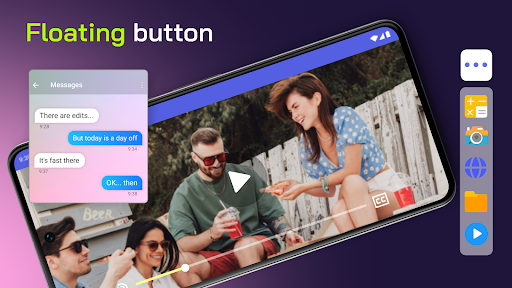
Split Screen Shortcut: Revolutionize Your Device!Have trouble using two apps at once? Say hello to the all-new Split Screen Shortcut – your ultimate mobile multitasking hack. Now, with our revolutionary mobile app, you can easily access and use many apps. Welcome to the future of device interaction with the Split Screen Dual Window! Here's why it's a game-changer! 📄 Key Features of Split Screen Dual Window: 📄 📊Dual Mode: A single Android screen runs and manages multiple tasks simultaneously; 🔘Floating Button: Access the Multitasking Screen with a need and requirement-powered option at a quick; 🌈Customizable Button: One can change the button's color to get it synchronized with the device's theme; 📳Vibration Alert: A vibration alert for every transition; 🌐User-Friendly Interface: The user interface is easy to operate and reach for every user; 🌐Offline Accessibility: It can work on Multitasking Screen features without an internet connection; Multi Screen Splitter - Unleash the Power!The Multitasking app will let you easily manage and run multiple apps simultaneously. Designed for those who need dual display that keeps up with their fast-paced life, the multiscreen splitter feature divides your display for effective multitasking. Experience Multitasking Like Never Before: 📲 Split Screen Dual Window is an excellent way to provide a fast process when using our app to view videos, type text messages, or work on documents. It assures users of a fluid experience in multitasking. This powerful tool is especially beneficial for professionals, students, and all those who want to maximize their productivity. Customize Your Experience With The Multi Screen Splitter: 🎨 Our Picture In Picture: Multiple Screen App can be tailored to your needs, from a color adjustment of the floating button to set up vibration alerts, all the way to the accommodation of any feature for your good. Anywhere, Staying Productive: 🌐 It means that you will remain productive no matter where you are because it provides offline accessibility of Split Screen Shortcut. No Internet? No Problem! You can continue using multi-screen splitter functionality with no hassle. 🌐 User-Friendly Interface: Seamless navigation! Enjoy a user-friendly interface that makes multitasking view intuitive and accessible for all users. Stay connected seamlessly! Set up vibration alerts for actions, ensuring you know every transition. Start Using Split Screen Dual Window Today: Get Split Screen Shortcut to make a difference in your device's use. Our Multi Screen Splitter app offers the best solution for multitasking screens for work or leisure. Step into the future of multitasking with our innovative app. Embrace the convenience and efficiency of Picture In Picture: Multiple Screen App. Start Using Split Screen Shortcut Now!Get access to the ultimate in multitasking. Download Split Screen Shortcut today and experience how easy multitasking and split-screen viewing can make your device an efficient productivity powerhouse. Experience the future with our multi-screen splitter and Picture In Picture: Multiple Screen App.
More like this
- Top Tools on Google Play by estimated revenue
- Split Screen - Dual Window alternatives
- Split Screen - Dual Window vs Taskbar
- Split Screen - Dual Window vs ParkMan - The Parking App
- All top charts and categories
Similar apps
TaskbarBraden Farmer4.3 ★ (19.7K)
ParkMan - The Parking AppParkMan Oy4.7 ★ (19.8K)
BixberryBixberry4.3 ★ (19.7K)
AT&T Personal CloudAT&T Services, Inc.3.6 ★ (19.8K)
psp games downloaduschultz4.3 ★ (19.7K)
Authenticator App: 2FA | MFAAuthenticator 2FA Lab4.3 ★ (19.8K)
Vsem VPN: Рабочая сетьVSEM NETWORK LLC4.8 ★ (19.7K)
All Video Downloaderadvanced downloader4.3 ★ (19.7K)